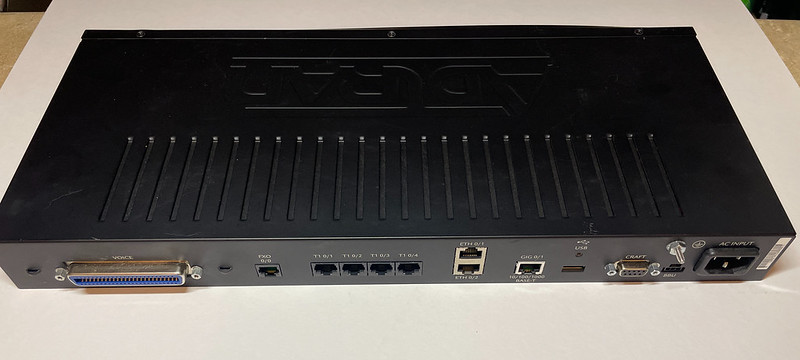
Adtran Total Access 908e
I’ve had an Adtran Total Access 908e (TA908e) VoIP/voice gateway for over a year now with the intent of replacing my collection of Cisco ATA and Grandstream ATA for the BBS and other modem stuff. Allegedly it does a better job at VoIP processing and gives me better line density, but first I need a working config for it which has been slow going.
It speaks SIP so it can be used with a ITSP/VoIP provider, and this configuration is what I will be going over in this post. It has 8 FXS/telephone ports via 50-pin breakout which I want to use for modems and it also has 4x T1 network interfaces so I can route calls over dummy PRI or T1s over to my Adtran Atlas 550.
Routing calls through to the Atlas 550 would also let me put something like a Courier I-modem or my Ascend Max 4000 up on a public DID for people to dial into for true 56k/x2/V.90 modem calls for a retro ISP or BBS. I’ll cover that in a future post but my TA908 config I have posted includes the T1 configuration for it anyways.
Call paths could look like this:
- PSTN DID 510-555-1234 -> voip.ms -> TA908e -> local FXS ports -> modem/telephones
- PTSN DID 510-555-1234 -> voip.ms -> TA908e -> dummy T1/PRI -> Adtran Atlas -> modems/ISDN devices
and vice-versa for outbound calls to the PSTN. In theory intra-extension dialing should work, a feature provided by voip.ms, but I haven’t tested this yet.
Update 5/9/2026: I got voip.ms extensions working, see bottom of post
My setup
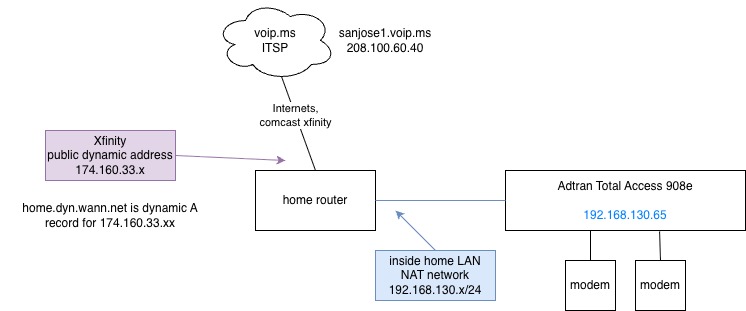
Diagram of setup
- Using voip.ms as my ITSP/VoIP service provider
- Using SIP/RTP as transport
- Comcast/Xfinity cable as ISP
- TA908e sits behind NAT/PAT because the world still hates IPv6
- DIDs for incoming calls to modems and outgoing too
- Multiple other ATA devices on home network
- Dial-up modems attached to TA’s FXS ports and a dummy PRI to an Adtran Atlas 550
TL;DR: config is up on a Github gist too. People are setting ‘domain’ wrong in their SIP configs.
The biggest problem I had was getting NAT and SIP set up just right and the right device type setup on the VOIP.ms sub-account I was using with it. I would see SIP INVITE messages hit the TA908 but it would just sit there like a lump and not do anything with them.
I configure this via the command line interface, but it shouldn’t be too hard to mimic these steps on the web UI. I figured out a lot of this config by changing a setting, combing through raw SIP packets to see what it actually did and if it got us further along. I am not a SIP expert and barely understand what a SIP trunk is, so bear with me for non-telco language.
SIP registration with VOIP.ms
VOIP.ms has this notion of “sub-accounts” hanging off of your main account with their own username/password for extra devices and they have the form of XXXXXX_<string> for example 123456_adtran1 used in this post and configs. This underscore character is particularly heinous to deal with in SIP headers on Cisco IOS but it’s somewhat more manageable on the Adtran. Adtran EOS still requires all numbers for things like DNIS matching and substitution, but does have some places where it understands SIP identities even with an underscore.
This is done under a “voice trunk type sip” section:
!
voice trunk T01 type sip
  description "SIP trunk to voip.ms"
  sip-server primary sanjose1.voip.ms
  registrar primary sanjose1.voip.ms
  registrar expire-time 600
  no registrar require-expires
  domain "home.dyn.wann.net"          <<< not voip.ms
  sip-keep-alive info 30
  register 123456_adtran1
  codec-list TRUNK both
  authentication username "123456_adtran1" password encrypted "3b6hashhashhashhashash47815"
!
The main bits are the sip-server, registrar, and authentication username. ‘domain‘ is important too as I’ll show in examples below. Here I’m using their sanjose1 POP, with sub account named 123456_adtran1. Because our SIP messages and and registration go to the same place at Voip.ms they’re set the same here.
Once the TA908e has registered with VOIP.ms, you should see something like this in ‘show sip trunk-registration‘:
ata06.wann.net#show sip trunk-registration

Trk       Identity       Reg'd  Grant  Expires Success Failed Requests Chal Roll
--- -------------------- ----- ------- ------- ------- ------ -------- ---- ----
T01       123456_adtran1   Yes     600     199  103135     83   206361 103146   81
To debug SIP messages such as registration, invite, etc. use ‘debug sip stack messages‘.
Setting Voip.ms device type

Account device type
Each account on Voip.ms has a toggle to change what kind of device it’s going to be used for. The difference is apparently the information and IP addresses that’s included in the SIP packets.
With the TA908e I am setting this to “Asterisk, IP PBX, Gateway or VoIP Switch“.
When using “Asterisk, IP PBX, Gateway” option, INVITE packets have the To: line as the sip: DID number and the public IP address (the public IP address Voip.ms saw you register from) and contains an X-Dest-User header with the account username. For this option you must set up a destination NAT rule. Example:
INVITE sip:510xxxxxxx@174.160.33.100:5098 SIP/2.0     << invite uses nat outside public ip address
Via: SIP/2.0/UDP 208.100.60.40:5060;branch=z17z31938ebc;rport
From: <sip:3412214808@208.100.60.40>;tag=as7bas0abf
To: <sip:510xxxxxxx@174.160.33.100:5098>           << to is the DID
X-Dest-User: 123456_adtran1                        << adds this x-dest-user header
Contact: <sip:3412214808@208.100.60.40:5060>
More on the public IP address 174.160.33.xxx in this packet below, this was the key to making this work for me.
When using “ATA device” type, the INVITEs look like this:
INVITE sip:123456_adtran1@192.168.130.65:5098;transport=UDP SIP/2.0    << inside NAT address of TA
Via: SIP/2.0/UDP 208.100.60.40:5060;branch=z9hG4bK2c86041f;rport
From: <sip:3412214808@208.100.60.40>;tag=as03b911d0
To: <sip:123456_adtran1@192.168.130.65:5098;transport=UDP>            << to is the registered SIP account
Contact: <sip:3412214808@208.100.60.40:5060>
It doesn’t contain the DID information at all, the To: field contains the sub-account name in the form XXXXX_string. But it doesn’t contain my public IP address so it traverses NAT without any static rules.
Home router NAT/PAT config for SIP to the TA908e
Because I have multiple ATA devices on my network that speak SIP back and forth to voip.ms, I have static inbound UDP ports pinned to each different ATA. This way they register themselves at being at a certain 50xx port and inbound SIP INVITES go to the right ATA. I also disable SIP conntracking on my router. I forget what conntrack did off the top of my head, I think it resulted in one-way audio which is obviously not what we want.
I set a source address of my NAT rules to voip.ms’ POP so the SIP UDP ports aren’t out there exposed to the world. Only packets from Voip.ms will pass the rule and come inside. I’m not sure how other ITSPs source their traffic so this might not work with othes.
x.x.x.x:5060 -> ata1
x.x.x.x:5062 -> ata2
x.x.x.x:5098 -> ata6
Example on Ubiquiti EdgeRouter:
# I forget what this does but pretty sure it's required
set system conntrack modules sip disable
#
set service nat rule 18 description 'VOIP-SIP to Adtran TA908e'
set service nat rule 18 destination port 5098                     # outside port number
set service nat rule 18 inbound-interface eth9                    # cable modem interface
set service nat rule 18 inside-address address 192.168.130.65     # address of TA908
set service nat rule 18 protocol tcp_udp
# Source address set for sanjose1.voip.ms so 5098 isn't just left open to the world
set service nat rule 18 source address 208.100.60.40
set service nat rule 18 type destination
Likewise on the TA908e it has to be configured to use a different SIP port instead of 5060. Here I’m using port 5098 which matches my router’s destination NAT config. This is done with these commands:
sip
sip udp 5098
One word of warning, I have configured this on the CLI then did some things in the web UI (I forget what exactly) and come back to find the SIP port was reverted back to 5060. So make sure to check this when troubleshooting.
Role of ‘domain’ in SIP config
The AOS Command Reference Guide describes ‘domain <name>‘ as:
Use the domain command to configure the assigned domain name for host messages. The domain is an unique identifier for the Session Initiation Protocol (SIP) users on the trunk. Use the no form of this command to disable this feature.
I am not a smart man and this means little to me. But what it really does is helps tell the TA908e “hey this call is for us to handle!”. I think some example configs going around have you set this as the domain-name of the VoIP provider or your own domain and that’s wrong. I think the docs could be worded much better here. It also fails to mention this could be used for _sip._udp. SRV lookups for a domain name too.
Here is where ‘domain sanjose1.voip.ms‘ is configured under ‘voice trunk T01 type sip‘. (sanjose1.voip.ms resolves to 208.100.60.40). Voip.ms will send this INVITE over and over to the TA908e but the TA908 never responds to them:
12:03:22.910 SIP.STACK MSG     Rx: UDP src=208.100.60.40:5060 dst=192.168.130.65:5098
12:03:22.910 SIP.STACK MSG         INVITE sip:5104701899@174.160.33.xxx SIP/2.0
12:03:22.910 SIP.STACK MSG         Via: SIP/2.0/UDP 208.100.60.40:5060;branch=z9hasdfasf258;rport
12:03:22.911 SIP.STACK MSG         From: <sip:3412214808@208.100.60.40>;tag=as323816bf
12:03:22.911 SIP.STACK MSG         To: <sip:5104701899@174.160.33.xx>
12:03:22.911 SIP.STACK MSG         Contact: <sip:3412214808@208.100.60.40:5060>
12:03:22.911 SIP.STACK MSG         Call-ID: 3b4cfba84024adf43cb55d1a73d8926d@208.100.60.40:5060
12:03:22.911 SIP.STACK MSG         CSeq: 102 INVITE
12:03:22.912 SIP.STACK MSG         User-Agent: voip.ms
12:03:22.912 SIP.STACK MSG         Date: Wed, 06 May 2026 19:03:22 GMT
12:03:22.912 SIP.STACK MSG         Allow: INVITE, ACK, CANCEL, OPTIONS, BYE, REFER, SUBSCRIBE, NOTIFY, INFO, PUBLISH, MESSAGE
12:03:22.912 SIP.STACK MSG         Supported: replaces, timer
12:03:22.912 SIP.STACK MSG         X-Dest-User: 123456_adtran1
Note the public cablemodem 174.160.33.xxx address in the To: field.
As soon as “domain 174.160.33.xxx” is configured the TA908 immediately responds with “SIP/2.0 100 Trying” and the rest of call setup. Rather than hard code my public IP address, which is subject to change, I entered in a dynamic DNS host record that always points to my public IP address. The TA apparently resolves this on each SIP message and that’s how it knows 174.160.33.xxx is us.
Verification
This can kind of be confirmed by watching the TA908 make a flurry of DNS lookups when it’s processing SIP INVITE messages for an inbound call. Here I set ‘domain "test1234.wann.net"‘ and made a DID call:
14:11:59.139 SIP.STACK MSG     Rx: UDP src=208.100.60.40:5060 dst=192.168.130.65:5098
14:11:59.139 SIP.STACK MSG         INVITE sip:5104701899@174.160.33.xxx:5098 SIP/2.0
14:11:59.139 SIP.STACK MSG         Via: SIP/2.0/UDP 208.100.60.40:5060;branch=9hG4bK0759b7db;rport
14:11:59.140 SIP.STACK MSG         From: <sip:3412214808@208.100.60.40>;tag=as56ff0884
14:11:59.140 SIP.STACK MSG         To: <sip:5104701899@174.160.33.xxx:5098>

tcpdump on dns server:
14:11:59.148231 ... SRV? _sip._udp.test1234.wann.net. (45)
14:11:59.148325 ... NXDomain 0/1/0 (94)
14:11:59.149467 ... SRV? _sip._tcp.test1234.wann.net. (45)
14:11:59.149535 ... NXDomain 0/1/0 (94)
14:11:59.150153 ... SRV? _sips._tcp.test1234.wann.net. (46)
14:11:59.150201 ... NXDomain 0/1/0 (95)
14:11:59.152086 ... AAAA? test1234.wann.net. (35)
14:11:59.152162 ... NXDomain 0/1/0 (84)
14:11:59.152328 ... A? test1234.wann.net. (35)
14:11:59.152373 ... NXDomain 0/1/0 (84)
Because test1234.wann.net didn’t resolve to anything, the TA908 never took action on the call. Once it was set back to my dynamic DNS host record that resolved to 174.160.33.xxx it worked again.
The appearance of SRV lookups supports the idea that “domain” really could mean your top level example.com domain too, provided you had the appropriate _sip._udp. records configured.
Troubleshooting
Manual
The Adtran AOS Configuration Reference is available on Adtran’s support community forum thingy, you’ll need to set up a free account.
https://supportcommunity.adtran.com/jmaxz83287/attachments/jmaxz83287/nv-aos/428/7/AOS%20R13.12.0%20Command%20Reference%20Guide.pdf
if that link doesn’t work, check the Software Download section under Total Access 908.
SSH
When connecting to a TA via ssh, newer operating systems may have a stricter set of ciphers and algorithms it expects to use. I use this in my ~/.ssh/config on my Macs:
Host 192.168.130.65 ata05
  Ciphers +3des-cbc
  KexAlgorithms +diffie-hellman-group1-sha1
  HostKeyAlgorithms +ssh-dss
  PreferredAuthentications password
Handy commands
# Display all SIP messages
debug sip stack messages

# Display all ISDN L2 messages, useful for tracking calls across PRI
debug isdn l2-formatted

# Show what debugging is enabled in order to turn them off with 'no'
show debug

# See SIP registration status
show sip trunk-registration

# Force SIP re-registration, e.g. when making Voip.ms account changes
sip trunk-registration force-register

# Show PRI to Adtran Atlas status
show interfaces pri 1
Oxidized config backups
Super useful to have automatic backups of your configs so you can go back to a known working state. I use Oxidized to poll all of my switches and routers every hour to copy off configs to git. I use a config model based off of Cisco IOS to expect a different prompt and with different SSH options
# config
models:
  adtran_ta:
    vars:
      ssh_kex: diffie-hellman-group1-sha1
      ssh_encryption: aes256-cbc,3des-cbc
      prompt: !ruby/regexp /([\w.@-]+[#>]\s?)$/
model_map:
  adtran_ta: ios

# router.db
ata06.wann.net,2002:2bda::16,adtran_ta,wannnet,wn_backup,secretsquirrel,secretsquirrel
Upgrade from R11.4.4.E to R13.7.0.E
Update 5/9/26: I decided to try an upgrade from an ancient R11 release to a not so ancient R13 release. So far the config has stayed the same, a new ‘no cos’ (class of service) entry on ‘voice user’, but no crazy rewrites or anything.
Handling voip.ms internal extensions
Update 5/9/26: I got voip.ms internal extensions working to a FXS port.
Voip.ms lets you assign an “internal extension” to your sub accounts so they can dial each other with a four-digit number (as long as they’re on the same POP). E.g. the modem on line 102 can call the modem on line 106 with ATDT106 without needing a DID phone number. The RTP stream still goes out to voip.ms and back, but this is fine. It’s actually perfect for what I want when the modem-voip naysayers are “but the call never leaves the ATA this will never work on the internet”, when in fact it does here. Plus extension to extension calls are free!
Anyways as my config first set, when I dialed extension ‘1010’ (associated with sub-account ‘123456_adtran1’) from my line ‘106’, the SIP INVITE gets a SIP/2.0 400 Bad Request and the call fails (lines omitted for brevity):
16:13:10.689 SIP.STACK MSG         INVITE sip:123456_adtran1@192.168.130.65:5098;transport=UDP SIP/2.0
16:13:10.689 SIP.STACK MSG         Via: SIP/2.0/UDP 208.100.60.40:5060;branch=z9hG4bK06407343;rport
16:13:10.690 SIP.STACK MSG         From: "Line 106" <sip:106@208.100.60.40>;tag=as321
16:13:10.690 SIP.STACK MSG         To: <sip:123456_adtran1@192.168.130.65:5098;transport=UDP>
16:13:10.690 SIP.STACK MSG         Contact: <sip:106@208.100.60.40:5060>
16:13:10.691 SIP.STACK MSG         Remote-Party-ID: "Line 106" <sip:106@208.100.60.40>;party=calling;privacy=off;screen=no
16:13:10.691 SIP.STACK MSG         Content-Type: application/sdp

16:13:10.699 SIP.STACK MSG     Tx: UDP src=192.168.130.65:5098 dst=208.100.60.40:5060
16:13:10.699 SIP.STACK MSG         SIP/2.0 100 Trying
16:13:10.699 SIP.STACK MSG         From: "Line 106"<sip:106@208.100.60.40>;tag=as395472e4
16:13:10.699 SIP.STACK MSG         To: <sip:123456_adtran1@192.168.130.65:5098;transport=UDP>

16:13:10.728 SIP.STACK MSG     Tx: UDP src=192.168.130.65:5098 dst=208.100.60.40:5060
16:13:10.728 SIP.STACK MSG         SIP/2.0 400 Bad Request
16:13:10.728 SIP.STACK MSG         From: "Line 106"<sip:106@208.100.60.40>;tag=as395472e4
16:13:10.728 SIP.STACK MSG         To: <sip:123456_adtran1@192.168.130.65:5098;transport=UDP>;tag=4d0aff78-7f000001-13ea-126056-3e48e5d0-126056
16:13:10.729 SIP.STACK MSG         User-Agent: ADTRAN_Total_Access_908e_3rd_Gen/R11.4.4.E
16:13:10.730 SIP.STACK MSG         Content-Length: 0
I figured out under “voice user XXXX” configuration you can add a “sip-identity” to associate the extension and FXS port with a SIP user on a given trunk.
My voice user config looks like this now:
!
voice user 9001
  connect fxs 0/1
  no cos
  password encrypted "asdfasdfasf"                         <<< default, not used
  did "5105551212"
  sip-identity 123456_adtran1 T01                          <<< magic bit, T01 is trunk registered with voip.ms
  sip-authentication password encrypted "asdfasdfasfd"     <<< default, not used, not relevant to voip.ms account
  no nls
  no echo-cancellation
  rtp frame-packetization 10
  rtp delay-mode fixed
!
Now when a DID call to 5105551212 or extension 1010 is dialed, the TA908 knows to route the call to this voice user, and thus to the FXS port and modem attached to it!
I did look up the “password” and “sip-authentication password” fields. They’re not optional (can’t remove them) and just hold defaults. The “password” is for a PIN associated with this user account for settings and voice mail (I don’t use them). The latter is apparently if some other SIP thing wants to register this voice user and holds a default value, again I don’t use this.