Feed on
Posts
Comments

Cambiocorsa vs GT

Dear people posting cars on auto trading websites: stop saying “Cambiocorsa GT”. The two terms are mutually exclusive. Coupe Cambiocorsa uses an F1 gearbox, Coupe GT uses and ordinary foot clutch.

Running!

I was super bored this evening, didn’t want to think about work, and I didn’t want to get tweaked out on coffee.  Instead I went running for three miles in the gym.

Looking over my notes, the last time I put on my running shoes was October 2007.  Prior to that, my last sponsored run was the Route 66 Half-Marathon in Tulsa in November 2006.  My poor heart didn’t like tonight’s surprise. It pretty much stayed at 200 bpm the whole run. Quads are sore, and I’ll probably be crippled in the morning.

My original photoshop of a fark photoshop has made the network nerd rounds, now it lives on in t-shirt form. The image changed for the shirt because I didn’t have a bigger original.  On one hand, there is a surprising number of stock photos of crying little kids on Getty Images and other internets. On the other hand, in the search for said images my browser and Google history are riddled with all sorts of searches that would sound bad in other contexts.

More lulz to be had at RAS’ Crazy Internet T-Shirt Emporium.

Good idea fairy

Beware of the good idea fairy.  This sprite not only plants the seed of faulty ideas in the brains of soldiers, but also people in IT.

rrdcached results

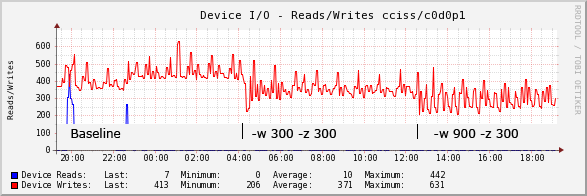
My Nagios boxes run pnp4nagios+npcd to record plug-in performance data to RRD files. On one system I enabled rrdcached on, a little over 9,000 files are updated every five minutes. I saw a 30% decrease in disk write operations/second, all other things held constant. There wasn’t a noticeable difference in bytes/second, which I guess is somewhat expected. I’d be curious to see what happens on a box with 100k RRDs, but I don’t have anything that big.

On its own, npcd already does a pretty good job of distributing writes out over time so all 9,000 writes don’t get committed at the same time, at an average of 436 ops/sec. Having said that, running with -w 300 -z 300 should be basically the same thing, but it was a 15% improvement at 357 ops/sec. Going further to -w 900 -z 300 to flush every fifteen minutes brought this down to 301 ops/second.

I was excited to see that rrdtool 1.4 was finally released (in October), and with it rrdcached support finally in a main release.  After updating rrdtool packages on a couple of my systems I sat out to make things start using the new caching daemon. Cacti was my first to play around with since it uses a fair amount of RRD files.  Cacti has been coasting a while on Boost (which I have yet to try and is recommended to me by friends), so nobody is going out of their way to add rrdcached support yet.

A quick and dirty patch to Cacti enabled it:

--- lib/rrd.php.orig        2010-01-08 22:36:56.000000000 -0600
+++ lib/rrd.php     2010-01-08 23:25:30.000000000 -0600
@@ -68,6 +68,9 @@
function rrdtool_execute($command_line, $log_to_stdout, $output_flag, $rrd_struc = array(), $logopt = "WEBLOG") {
global $config;

+        $daemon_path = "unix:/var/run/rrdcached/rrdcached.sock";
+        $command_line = $command_line . " --daemon $daemon_path ";
+
if (!is_numeric($output_flag)) {
$output_flag = RRDTOOL_OUTPUT_STDOUT;
}

A strace of the rrdcached process showed it was being called when I was viewing graphs, but the poller wasn’t working. Turns out Cacti uses rrdtool update --template everywhere, which is incompatible with rrdcached:

01/08/2010 11:29:14 PM - POLLER: Poller[0] CACTI2RRD: /usr/bin/rrdtool update /var/www/cacti/rra/tifa_abc_wann_net_load_5min_59.rrd --template load_5min 1263014937:0.05 --daemon unix:/var/run/rrdcached/rrdcached.sock
ERROR: The caching daemon cannot be used together with templates yet.

I don’t know offhand what the conflict with templates and rrdcached is. I can only guess that the cache internals doesn’t know how to deal with the extra DS information. Looks like we’ll be stuck with Boost a while longer.

rrdgraph vs rtgplot: ugly

libdbi support in RRDtool, RTG/JRTG

The other thing I’m interested in visiting again is the rrdgraph libdbi support.  I heavily use the JRTG SNMP poller along with the old rtgplot from RTG to draw graphs from the data it stores in a MySQL table. I hate rtgplot. The output isn’t nowhere as polished as what rrdgraph can do.

More importantly, rtgplot has no concept of unknown time samples. If there’s no data for an interface (poller broke, router down) for several sample periods, it plots the in/out lines from last known values to the next known values, hiding the gap. (Zero delta-insert otherwise gets around this — if the router was actually polled and the counter was zero)

Enter DBI support in RRDtool. Using rrdgraph to plot my JRTG counter data in MySQL. It holds great promise, providing pretty graphs, the option to average, and finally being able to get rid of the last original bit of RTG. Unfortunately, the last time I tried DBI support in 1.3.999something I was sorely disappointed. It worked, but it was *slow*, especially on yearly plots. What took 2-3 seconds to render with rtgplot took *minutes* to do with rtgraph_libdbi.

I know for a fact my database server can return a year’s worth of counter data (105,120 rows) in 1-2 seconds, even with an empty query cache. (protip: UNIQUE KEY 'id' (id,dtime)) It’s so silly, that I even wrote a rtg2rrd.pl script to dump a year’s worth of data, build a brand new RRD file on ramdisk with one massive RRDs::update, and generated a graph from that: 5 seconds.

So hopefully rrdgraph_libdbi has improved since then. We’ll see!

Hello web robots

Looking at webserver logs, web crawlers are my most popular visitors today:

  • Feedfetcher (Google): 32
  • Baiduspider (Baidu): 15
  • Googlebot (Google): 12
  • Yahoo! Slurp US: 12
  • Yahoo! Slurp China: 2
  • BlogSearch (IceRocket): 4

I guess if I have anything to say, it’ll be indexed somewhere!

A peep pointed me to a very interesting presentation by Robert Lustig, M.D., a Professor of Pediatrics at UCSF, called Sugar: The Bitter Truth. It’s fairly technical and goes into the biochemistry of glucose (table sugar), fructose, and ethanol to explain how the body (specifically the liver) metabolize all three. He describes the change in fructose intake over the past 30 years and what it’s done to world heath, eventually using the comparison of fructose and ethanol to prove fructose is a chronic poison like ethanol. Then he goes on to explain how this is winding up being fed to our infants, jumpstarting obesity and other health problems.

I’ve been anti-sugar, anti-sweetner for a few years now, unfortunately still taking in a good amount of HFCS in my diet. I found presentation very interesting because it shows exactly what happens inside the body, and fills in the “why” gaps of what’s good/bad about sugars.

First post of the decade!  And to think 10 years ago I was waiting for the digital world to end when 2000 rolled around.  Long live 2038!

Catching up

When you want  to encourage search engines to index your site, don’t forget the robots.txt you wrote in 2002 that says Disallow: /.  It kinda doesn’t help.  Both Google and Bing have some interesting tools to help manage your search listings. Both will tell you the last time you were crawled, errors found, and other useful stats.

Also, dear lazywebs: I’m looking for a VPS in Asia/Asia Pacific with native IPv6 to add to my borgcube.  NTT Singapore claims to have such a service, but they seem very expensive.  hosting.ipv6.com claims to have them as well, but nobody has ever replied to my inquiries.  I’d almost settle for a server on paintcans at this point.

I hate selinux

It turns out my problems with IPv6-only Net-SNMP wasn’t a problem with snmpd, it was a problem with selinux. After starting with -Dread_config -c /etc/snmp/snmpd.conf it became apparent:

snmpd[9026]: registered debug token read_config, 1
snmpd[9028]: /etc/snmp/snmpd.conf: Permission denied
snmpd[9028]: Warning: no access control information configured.   It's unlikely this
agent can serve any useful purpose in this state.   Run "snmpconf -g basic_setup" to
help you configure the snmpd.conf file for this agent.
snmpd[9028]: NET-SNMP version 5.3.2.2

Sure enough, selinux was on without me realizing it:

[root@nicky root]# /usr/sbin/getenforce
Enforcing

Copying over my own snmpd.conf had fouled up the security context:

[root@nicky snmp]# ls -lZ
-rw-r--r--  root root user_u:object_r:user_home_t      snmpd.conf
-rw-r--r--  root root system_u:object_r:etc_t          snmpd.conf.orig
[root@nicky snmp]# chcon -u system_u -t etc_t snmpd.conf
[root@nicky snmp]# ls -lZ
-rw-r--r--  root root system_u:object_r:etc_t          snmpd.conf
-rw-r--r--  root root system_u:object_r:etc_t          snmpd.conf.orig
[root@nicky snmp]#

Now everything is all happy:

[bwann@raptor ~]$ snmpget -v 2c -c community udp6:nicky sysName.0
SNMPv2-MIB::sysName.0 = STRING: nicky.wann.net

Protip: you can also make Cacti use IPv6/UDP requests. Preface your system hostname with udp6: in the device configuration section.

« Newer Posts - Older Posts »