Feed on
Posts
Comments

TuxedoCat Lounge BBS

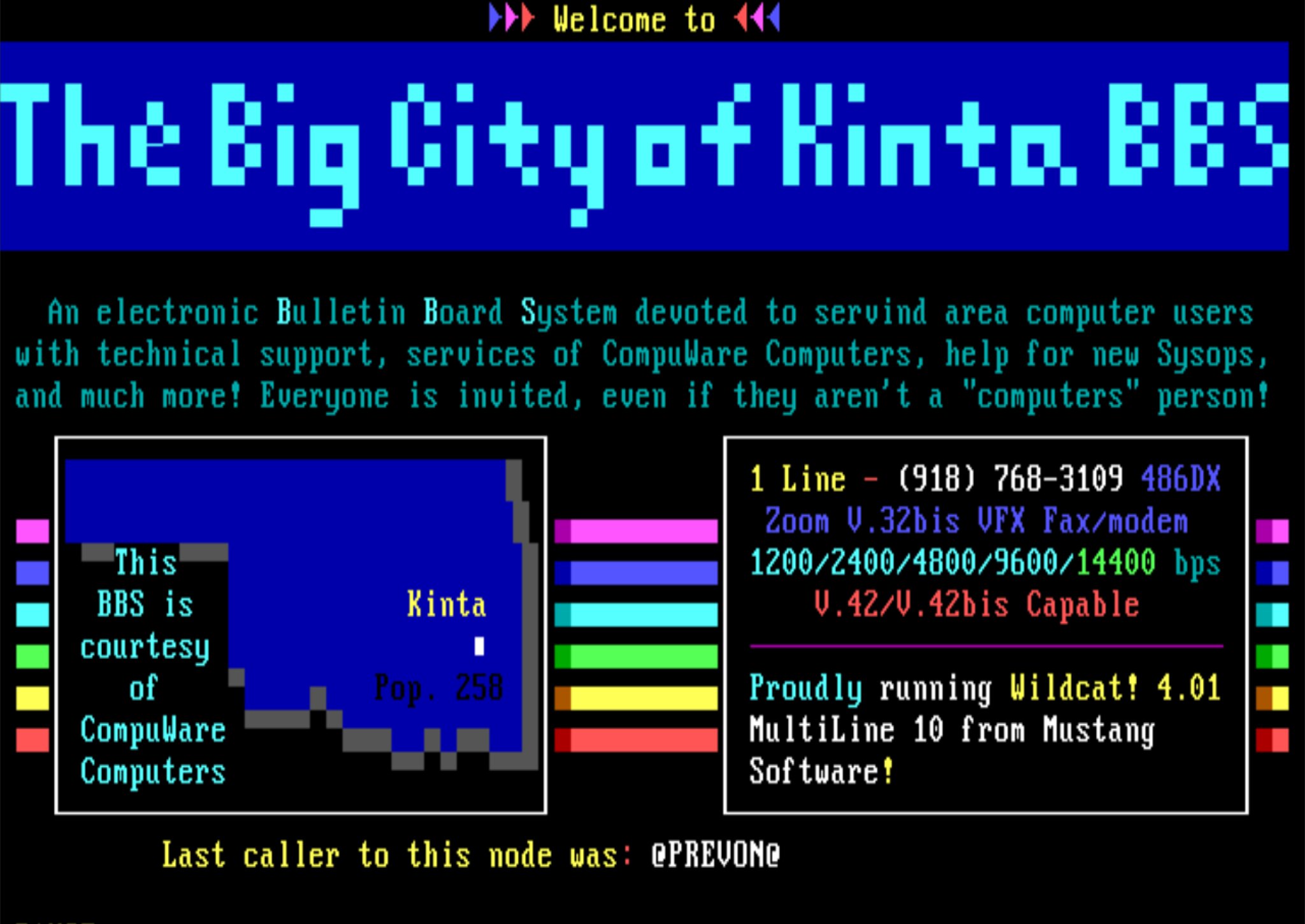
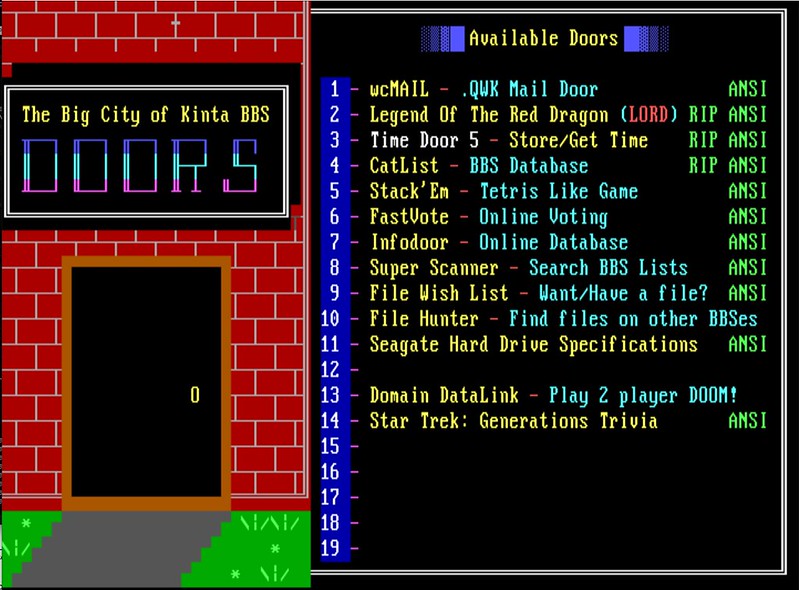
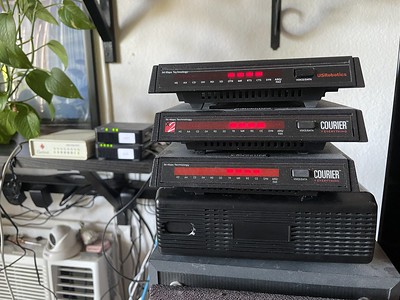
This year’s project has been running a vintage DOS-based bulletin board system like I use to run in 1995 before I started my ISP. I’m running Wildcat! 4.20 Multiline 10, the same as I did back then, except now under Windows 7 32-bit instead of Windows 95. It has real US Robotics Courier modems that you can dial into, along with supporting telnet connections. I have several drafts written up about the project, I just haven’t decided where to start. (Some info is linked at a top tab on my site)

I had my first ever Internet interactions with BBSes that offered e-mail gateways and had my first e-mail address in 1994. I wished to do the same thing back then, but it just wasn’t affordable for a teenager between the provider fees, long distance charges, and frankly I had no users.

Most BBSes did not have TCP/IP stacks until the late 90s, thus no SMTP. For message networks, dial-up modem store-and-forward was the name of the game, be it FidoNet, or calling up a UNIX system and using UUCP (UNIX to UNIX copy) to gateway mail+usenet to the Internet.

After setting up my Wildcat! board this year I pondered if it was possible to set up wcGate and actual, authentic dial-up UUCP in 2023. All the traditional UUCP mail+usenet news providers are long gone, even the TCP based ones, so I’d have to roll my own. Most documentation explaining how to set up a BBS to use a UUCP or Internet Service Provider spent far more time explaining how to secure a Internet domain name, describing how expensive an ordeal it was, or preaching netiquette, and virtually nothing about what happens under the hood as that was the provider’s job. I have no experience at all with UUCP and wanted to see if I could get it working.

wcGate
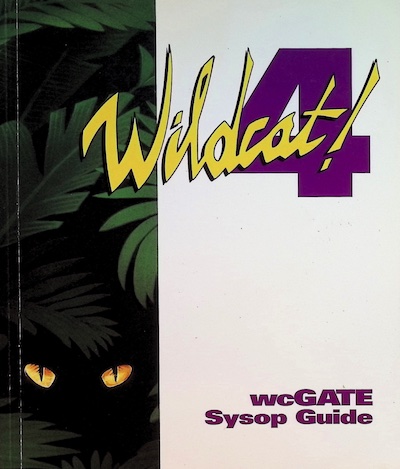
The elusive wcGate Sysop Guide

The accompanying message handling software for Wildcat! was an add-on called wcGate. This served as a message gateway from the BBS to a variety of systems such as Novell MHS (mail to Novell Netware users in your org), other BBSes, and Internet email and usenet newsgroups via UUCP and satellite connections (e.g. the now defunct Planet Connect, PageSat).

It was a whole side quest getting documentation for wcGate. It’s long since been discontinued and I hear when Mustang Software sold off Wildcat!, no manuals made it. I had my old sysop manual for Wildcat!, but not wcGate. I spent weeks searching Google, Bing, Pirate Bay, Reddit, FB groups, BBS libraries, BBS archives, eBay, university libraries, nothing. Out of pure desperation and curiosity I searched the Library of Congress and found they actually had a physical copy in their collection and I was seriously in contact with them to have it duplicated just to amuse myself (they balked until I could get copyright holder permission because they were technically selling me a copy). Eventually somebody on Facebook heard my plea and very graciously got me a copy of the manual, and I set off to figure out how to get it set up.

I threw together a Raspberry Pi, Taylor UUCP, an extra modem as my UUCP host and got wcGate talking to it in a couple of afternoons. Despite getting a 40 year old protocol working with a 30 year old DOS application, it was actually pretty straightforward.

I won’t go into the implementation details here, I’ll save that for another post. However I will go through the life of a message. I will soon upload Chef cookbooks to Github that I created for setting up DKIM, mgetty, and UUCP.


Topology
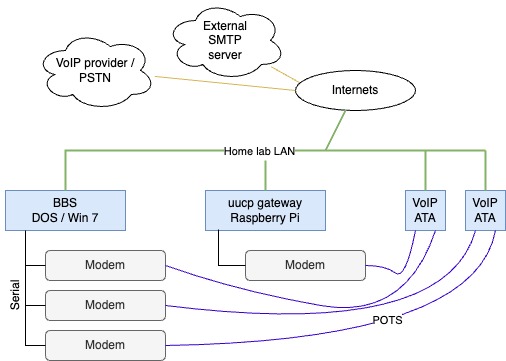
  • Modems are connected to Cisco analog telephone adapters (ATA191, SPA112), and subscribed to a VoIP provider to provide a real phone number for inbound calls
  • Each modem has its own telephone extension which allows for internal calls for free
  • tuxedocat” is the UUCP site name of the BBS, and “wannnet” is the UUCP site name of my Raspberry Pi.
  • wcGate automatically maps an e-mail address of <firstname>.<lastname>@tuxedocatbbs.com to users on the BBS.
  • uucp.wann.net is the FQDN of the Raspberry Pi.


BBS message to Internet walkthrough

It’s worth emphasizing that this is a batch process, it’s not real time like SMTP. In the old days a BBS without a full time Internet connection might dial up a UUCP provider once or twice a day to send e-mail to the Internet, meaning it may take 24 hours from the time you sent it before the recipient got it. If they replied to it, it might take another 24 hours for the reply to make it back to the BBS!

Here at TuxedoCat Lounge the e-mail is processed every 2 hours.

New message
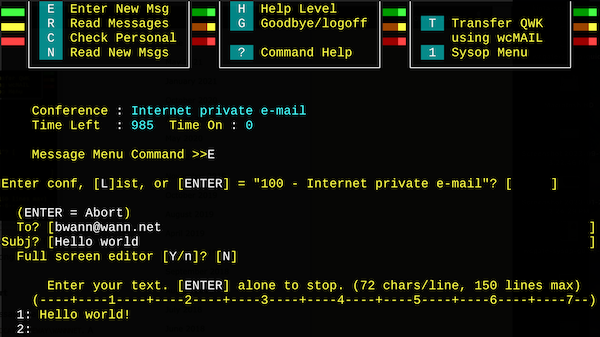
Creating a new message on the BBS

First we’ll join the Internet e-mail message conference on the TuxedoCat Lounge BBS, and create a new message. Wildcat! supports long To: fields for Internet e-mail, it used to be you had to kludge this by putting the e-mail address on the first line of the message.

Batch export of messages and prep for transport

Behind the scenes on another node or during a scheduled event, wcgate export is run. This exports messages from the Wildcat! message database to UUCP working files in a local spool directory, here in C:\WILDCAT\GATEWAY\WANNNET. A message-id and e-mail headers are generated for each message.

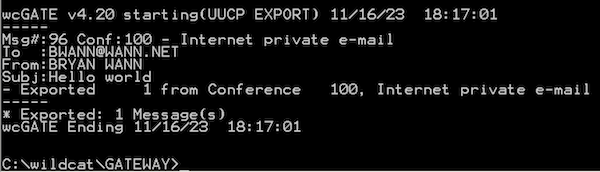
Running wcGate to export messages

Normally this is all ran from a batch script via node event every few hours to export, call the UUCP provider, and import replies.

In the spool directory, for each outbound e-mail there are three files: .CMD, .DAT, and XQT.

One good reference for these files can be found in the IBM z/OS manual.
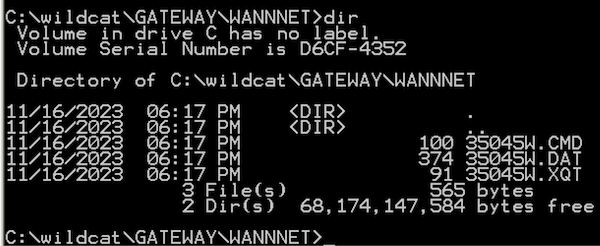
UUCP working files created on BBS for test message

.DAT – data file, contains the actual e-mail contents, and message header.

.CMD – command file, contains two lines to perform two file transfer requests.

C:\wildcat\GATEWAY\WANNNET>type 35045W.CMD
S 35045W.DAT D.tuxed35045W root - 35045W.CMD 0666
S 35045W.XQT X.tuxed35045W root - 35045W.CMD 0666

The format is

‘S’ – send a file from local to remote, followed by the local filename, and then the destination filename. The sender name, in this case ‘root’, then the local temporary file name (??), and local file permissions. Since this is a DOS machine, wcGate fabricates the root and file perms fields for us.

.XQT – execute file, contains a list of commands we want the remote site to execute for us.

C:\wildcat\GATEWAY\WANNNET>type 35045W.XQT
U bryan.wann tuxedocat          # <- remote user, remote site
R bryan.wann                    # <- ??
F D.tuxed35045W                 # <- filename to run
I D.tuxed35045W                 # <- file to use as STDIN to the app
C rmail bwann@wann.net

In this case we want the remote site (our UUCP gateway) to ultimately run rmail bwann@wann.net, that is, run the Unix rmail command with the argument bwann@wann.net and use the file D.tuxed3504SW file as STDIN which contains the message. (More on rmail later)

Note that all of these UUCP commands are baked into wcGate, we have no ability to fiddle with them.

FX UUCICO

Running uucico to contact the remote site ‘wannnet’

Once the message(s) have been exported to the spool directory, it’s time to dial-up our UUCP host. This is done by a DOS-based software included with wcGate called FX UUCICO (unix to unix copy in copy out). Configuration files in C:\WILDCAT\GATEWAY such as DIALERS, SCRIPTS, SYSTEMS, FXUUCP.CFG tell UUCICO how to interact with the outside world.

DIALERS – contains a list of modem definitions, modem speeds, and expect-style chat script to send AT commands to the modem for initializing, dialing, and how to know when the call is connected.

SCRIPTS – More expect-style scripts for logging into the remote UNIX UUCP host, e.g. look for the login: and password: prompts, send passwords, and any other extra UNIX shell commands before starting the UUCP transfer.

SYSTEMS – A list of remote systems/hosts we’re allowed to connect to. This ties together which modem to use from DIALERS, which chat script from SCRIPTS to log in, and what username/password to use for logging in.

FXUUCP.CFG – contains configuration commands such as our local site name, which type of comm/serial driver to use, buffering, and how many times to retry the call.

C:\WILDCAT\GATEWAY\UUCICO.EXE is ran, specifying which system to connect to. It creates a lockfile for the modem serial port, and sends AT-commands to dial the UUCP host. After dialing and logging in, the UUCP copying magic happens.
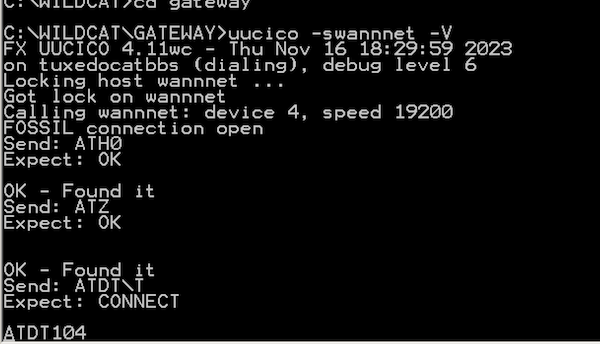
uucico dialing extension 104 on the modem

UUCP host/gateway/provider
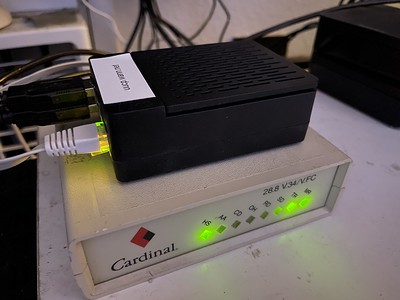
Raspberry Pi and dial-up modem acting as UUCP provider

I use a Raspberry Pi running Debian 12, Taylor UUCP, Postfix, mgetty, and an old Cardinal 28.8k modem as my UUCP <-> SMTP gateway. This sits on my homelab LAN, and to avoid problems trying to run an Internet-facing SMTP server at home, mail is relayed to/from my public SMTP server at Linode. For the modem’s telephone connection it’s connected to one of the same Cisco ATAs as the BBS modems are connected to, so the call does not have to go out to the Internet nor PSTN.

I thought this was going to be a giant ordeal and I was going to miss some glaring chunk of the big picture, but since I was just taking inbound calls it wound up being pretty easy. Postfix provides an rmail binary (and in some packages it’s just a wrapper script around sendmail) for UUCP->SMTP, and the stock master.cf config already has a entry for calling UUX for SMTP->UUCP. Thank god for applications keeping legacy configurations around!

To give e-mails an extra boost to avoid being spam filtered, I set up DKIM to sign messages as soon as they’re received from the BBS, and added SPF rules to the DNS domain. This seems to help with Gmail, but not everywhere. Troubleshooting my SMTP relay and setting up DKIM took far more time than the rest of this project.

Mgetty interfaces with the modem, providing a plain ordinary login tty when the modem answers.

The BBS has its own Linux user account on the UUCP host, called Utuxedocat. There’s not a lot special about it. It’s homedir is /var/spool/uucppublic and it’s shell is set to /usr/lib/uucp/uucico. The password for the uucp connection is also in /etc/uucp/passwd, because uucico can’t read /etc/shadow.

The username starts with the letter ‘U‘ to traditionally indicate it’s a system dialing in, and not a user. mgetty can also be configured to automatically start uucico if a login name matches U*.

When the Utuxedocat account logs in, it automatically starts up uucico instead of a shell like bash. There’s a whole little handshake process taking place between uucico on the BBS machine and the one on the Linux machine. Things like transfer protocols, packet and window size are established. FX UUCICO actually can log this in great detail which is kind of interesting if you want to get into the weeds of how it works.

Update 14-May-2024:

After learning more about UUCP thanks to the Bear book, I learned there’s a couple of ways to start up UUCICO. One way is like how I’m doing it and mgetty is answering the phone, gets the username, and then passes off authentication to either uucico or /usr/bin/login. In this case uucico is running as user ‘uucp’, it can’t access /etc/shadow, and thus you must use the Taylor /etc/uucp/passwd file to authenticate users. (Note: in this case /etc/uucp/passwd must be owned uucp:uucp, mode 640). I haven’t tested this but I’m pretty sure it means the unix password can be locked for the Uusername account as it’s never used. Another benefit of mgetty is that it also lets you start up PPP sessions to modem callers if you’re doing that sort of thing.

One is to set /usr/lib/uucp/uucico as the unix account shell so uucico and only uucico starts up right away. This would be useful for inbound TCP connections, and I think it would use the shadow password file for authentication.

Here is where mgetty has answered the phone, the username is passed to uucico, uucico authenticates the password, and then presents the “Shere” (system here) prompt.
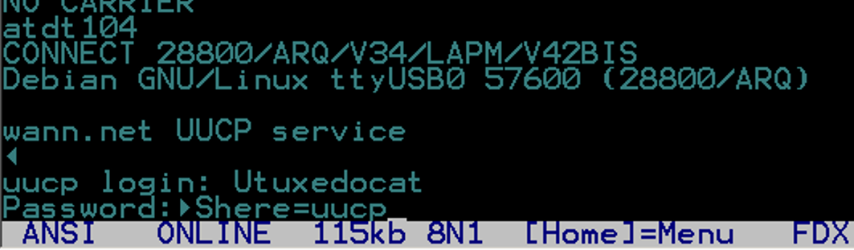
 

Example of logging in and seeing the “Shere=uucp” session start message from the remote uucico program

Pending spool files are transfered, and uux is called to execute rmail (from the .XQT file) on the remote system to send mail messages to Postfix. (This also happens in reverse, pending incoming email from the Internet that are spooled up on the UUCP host are fed to a dummy ‘rmail‘ command on the BBS machine.)

UUCICO finishes and hangs up. Any email destine for the Internet is processed normally by Postfix and sent out via SMTP.

Here’s the log file from /var/log/uucp/Log with our Hello World:

uucico tuxedocatbbs - (2023-11-16 18:30:47.52 281914) Handshake successful (protocol 'g' sending packet/window 64/7 receiving 64/7)
uucico tuxedocatbbs root (2023-11-16 18:30:48.70 281914) Receiving D.tuxed35045W
uucico tuxedocatbbs root (2023-11-16 18:30:50.01 281914) Receiving X.tuxed35045W
uucico tuxedocatbbs - (2023-11-16 18:30:50.59 281914) Protocol 'g' packets: sent 6, resent 0, received 13
uucico tuxedocatbbs - (2023-11-16 18:30:51.18 281914) Call complete (6 seconds 465 bytes 77 bps)
uuxqt tuxedocatbbs bryan.wann (2023-11-16 18:30:53.20 282183) Executing X.tuxed35045W (rmail bwann[at]wann.net)

It has received the data and execute files that wcGate generated, and executes the request.

And here’s where Postfix picked up the message from rmail, signed with DKIM, and sent out via SMTP to the Internet:
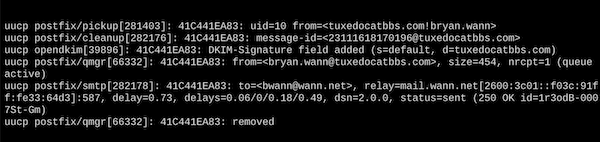
Postfix log showing message sent to the Internet

Success!

Here is the email from the BBS in my inbox (DKIM header removed for brevity):
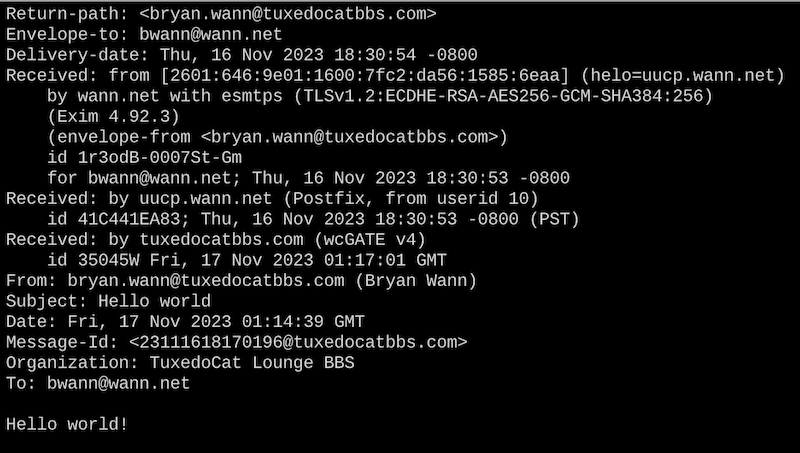

An e-mail reply

When I reply to my message from the BBS and send it using SMTP, Postfix will receive the message and then call out to UUX to write it to the local spool directory:

Postfix handling a message from SMTP and delivering to UUCP spool

Likewise there’s an entry in /var/log/uucp/Log showing the UUCP subsystem processed it and it’s sitting in the spool directory:

After another cycle of running UUCICO on the BBS machine:
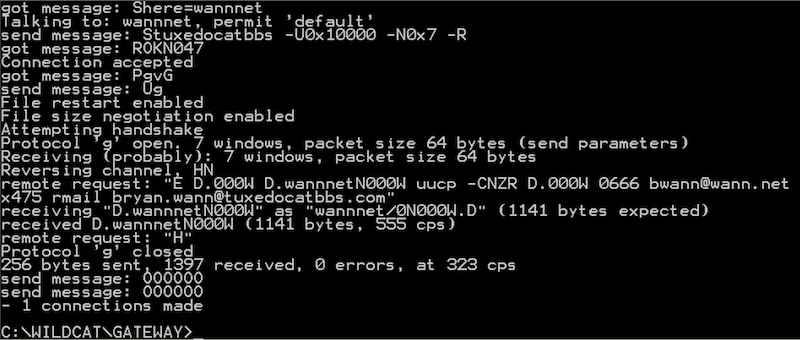
Any email/replies destine for the BBS are now sitting in C:\WILDCAT\GATEWAY\WANNNET:
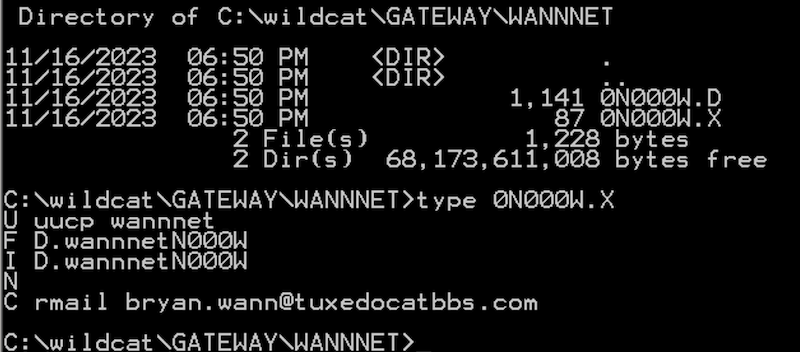
 

Batch import of new mail

wcGate is ran again, this time with an import command. This reads emails from the local spool directory and inserts them into the Wildcat! message database.
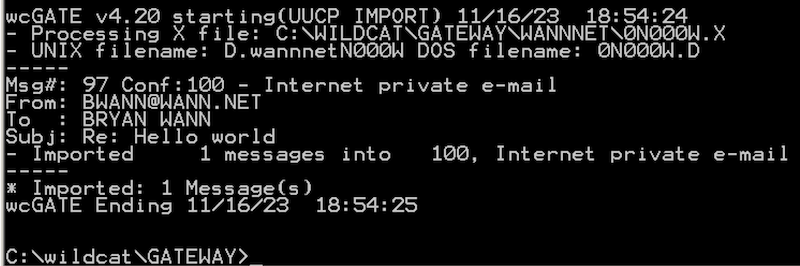
Now the email shows up ready for the caller to read!
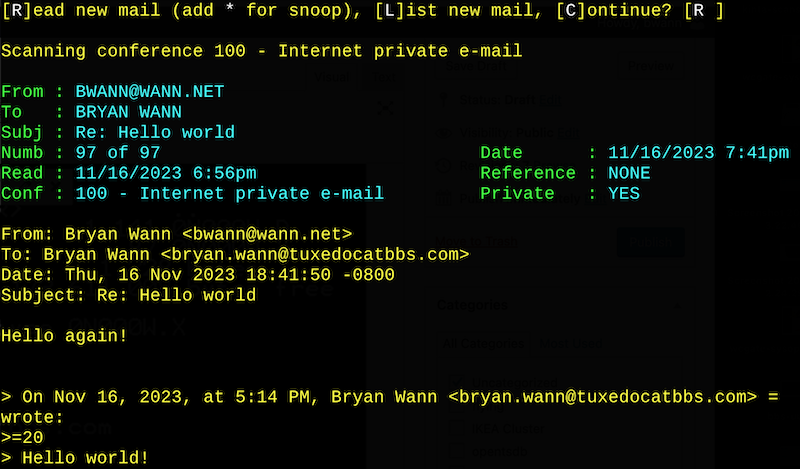

Will I be a purveyor of fine UUCP service for retro setups? Maybe. I’d like to learn more about UUCP workings, and maybe get private usenet working before then.

Update 2024-03-26: The Internet Archive has a copy of the 1996 book Using & Managing UUCP 2nd edition which is a great in-depth guide to UUCP!


Vandenberg Space Force Base (f/k/a Vandenberg Air Force Base) in southern California is where most west coast rocket and missile launch activity happens, dating all the way back to the 1950s. Lately people may know of it as where SpaceX launches payloads on Falcon 9 and ULA launches Atlas and Delta rockets. It’s also where the USAF test fires all sorts of missiles including intercontinental ballistic missiles, such as Minuteman III.

In the case of a Minuteman ICBM test, what they will do is pull a random active missile from a silo in Montana, Wyoming, or North Dakota, remove the nuclear warhead, and truck it down to Vandenberg. Here they will mount an instrumented dummy warhead on it, and store it one of the many silos right on the coast.

Usually about 4 times a year they’ll regularly launch a test Minuteman III from Vandenberg toward the Kwajalein Atoll, way out in the Pacific Ocean on the other side of Hawaii. This is done to test readiness, maintenance, and try out new technologies. These tests are scheduled way in advance and are publicly announced as to not escalate tensions somewhere. Generally a press release is sent out a couple of days ahead of a test, sometimes noting which launch facility will be used, and the launch window. If you don’t mind dropping everything at a moments notice to drive there and going to sit in a lawn chair for potentially 8 hours in the cold, you can watch one get launched.

Anyways as part of following SpaceX, ULA, and USAF launch activity there, I spent a while reading up on the various history and lore of the area. I’ve been down there several times to photograph launches, often with time to spend wandering around the area after a scrub. Apparently it was tradition after successful launch for all the technicians and whatnot to head over to a small steak house called The Hitching Post in Casamilia for a beer and steak, which is just a short drive away from Vandenberg. I went there in 2018 and it’s mostly nondescript, except for all the mission badges mounted on the wall and stickers plastered on the mirrors in the bathroom and behind the bar.
A while back I came across this video which described in more detail what happened when a Minuteman missile was launched toward Kwaj. After launch, radar stations at Hawaii and Kwaj will track the incoming missile and warhead, and measure the accuracy of the impact of the warheads vs the intended target. Around the 6:42 mark of the video, they describe the tradition of the launch teams going to Hitching Post, tallying up the number of yards the warheads missed their targets, and then drinking that many yard-sized glasses of beer. Interestingly, the narrator says the person starting off the yard glass activities is Launch Director Randy Eady, and the credits say the video was written and directed by Randy Eady.

I don’t have another source to back this story, but it sure seems plausible, because what an excuse to drink beer.


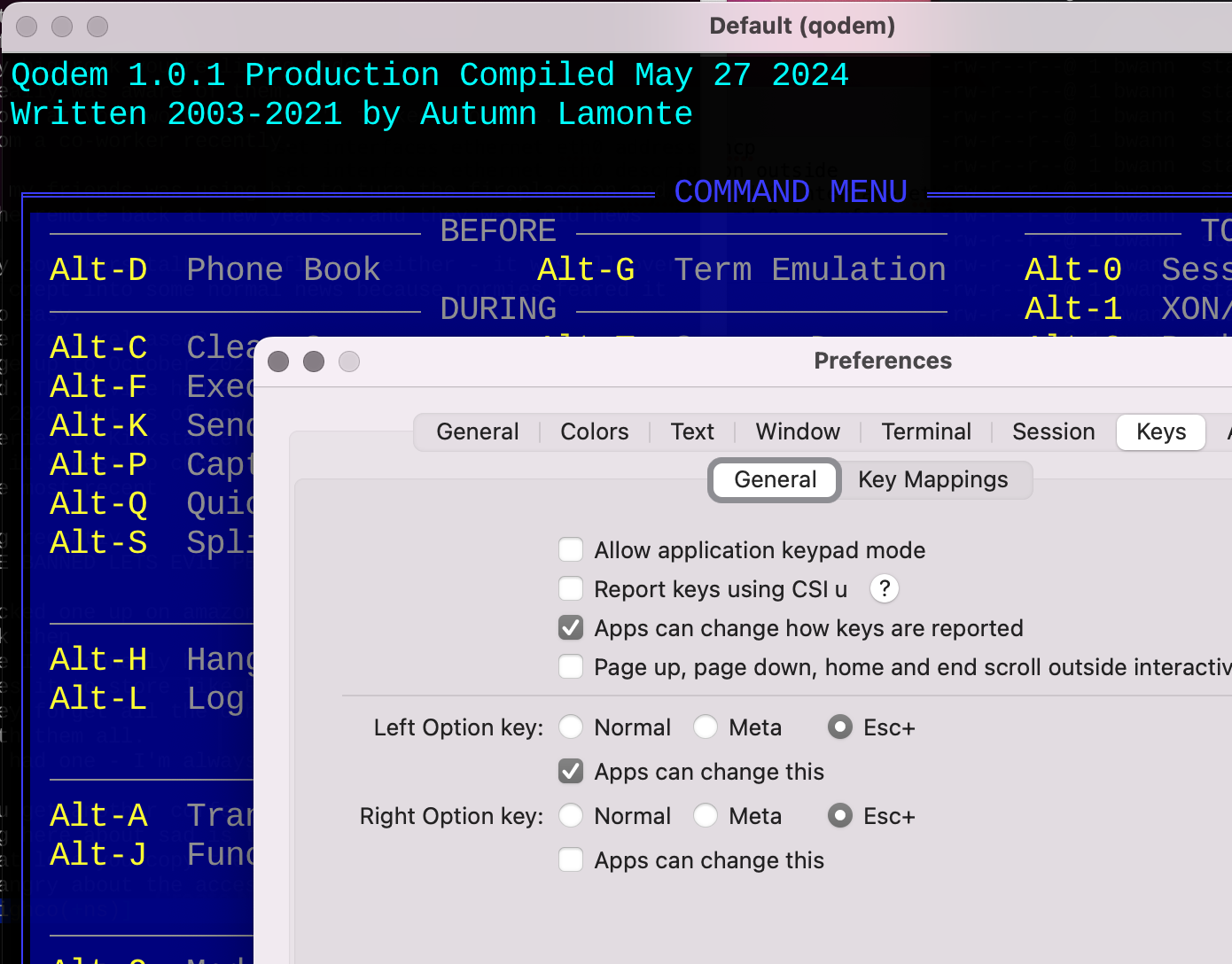
If you’re running Qodem on MacOS with iTerm2, you may notice extended ASCII/code page 437 characters don’t render as lines, but just a bunch of letters like PPPPPPPPPPPPPPPPPPPP. Try unsetting the environment variable TERMINFO_DIRS (unset TERMINFO_DIRS) before starting Qodem. This seems to have fixed it for me.

I figured this out by noticing when I ssh’d from my Mac to a Linux system and ran Qodem, extended ASCII and ANSI escape sequences rendered just fine. However, when I ran Qodem locally from my Mac, all of the line drawing was messed up. I’m reasonably sure it was compiled right by the Homebrew community but couldn’t see any other reason for it to not render correctly. For giggles I did ssh localhost, ran qodem again on the same Mac and to my surprise everything rendered correctly!

I did a little diff’ing of env before and after unsetting things and finally settled on the TERMINFO_DIRS variable that was doing it. It gets set locally, but unset when ssh’ing to a remote system. I don’t know offhand what the difference is in the terminfo iTerm is using vs system terminfo, I just know it fixed my problem.

(For reference I’m running iTerm2 with the Cousine font, and Courier New for Non-ASCII Font, and UTF-8 character encoding. TERM is set to xterm-256color too.)


Before, running Qodem in iTerm2 on MacOS:


Yuck!

After running unset TERMINFO_DIRS before running Qodem:


Much better!!


Terminal.app

This doesn’t seem to be an issue in the standard Terminal.app, as it doesn’t define any sort of custom TERMINFO variables. However Terminal.app does seem to enforce a character and line spacing of “1” which gives ANSI graphics a bit of a screen door effect, which is mildly annoying to me.

Default Terminal.app settings


Wasted

[photos: flickr – Seagate ST-225 repair]

A follow-up to https://binaryfury.wann.net/2023/07/2023-drive-belt-saga/

I wound up buying another “parts only” Seagate ST-225 hard drive off of eBay to attempt to fix my ST-225. This is a 20 MB MFM drive out of the old family 286 computer. Long story short I’m pretty sure my repair worked but ultimately the drive wasn’t recognizable by the BIOS. I think track 0 (on the outermost of the platter) was too knackered up for it to be found. This could have been due to the move.  I don’t know if there’s any software I can use to get any sort of raw dumps since the drive doesn’t even get recognized.

As an aside when working on my 486, I noticed in the 5.25″ floppy drive there’s totally a stepper motor and a split band assembly in there. I’m wondering if I could’ve stolen one off an extra floppy drive, if it was long enough to resize to what I needed.


Donor drive before fiddling

Opening up the new donor drive both of its split drive bands were intact which was great. Upon further inspection I found one of the read/write heads had broken off and was rattling around in the drive, which explains why it was dead. A literal hard drive crash.

Crashed/missing drive head on donor drive


I very carefully disassembled the donor drive bands, taking lots of close up pictures beforehand so I would see how the various bits like washers and ends were orientated so I could do the same on the old drive.

After some very careful threading and tugging, I got the drive bands on my old drive. Tip: mount up the left band first to the two studs, then do the rightmost band. At the end of the band next to the screw hole is an extra hole, put a paperclip or something through this to let you keep everything under tension while trying to thread up the screw.

Bands assembled on old drive

After hooking my old drive back up to the 286 and booting it, I could see the stepper motor spinning and it sounded like it was seeking. Unfortunately POST paused and it coughed up the C: drive error.

After a couple of reboots I decided to throw in the towel. I just had to open up the drive to see if my fix worked. This probably destroyed the heads with dust or something. Turning on the system again, the heads did fully seek across the platters and back. It had a slight ticking sound like maybe it was trying to seek further than it could so I don’t know if maybe there’s an index on the stepper motor and I twisted it out of place when working on it.

Maybe someday I’ll get back to working on it…


Seeing if my fix worked

486 of Theseus

[photos: flickr – 486 of Theseus]

I originally bought this 486DX2-66 system on eBay because I needed a legacy system with a floppy disk controller to run a Colorado tape drive, which it coincidentally had one, and Windows 95. The motherboard has VESA local bus slots on it too, something I wanted if I wound up getting a 486. VLB motherboards are running a couple hundred dollars on eBay because they’re getting hard to find, so I figured might as well buy the loaded system and get drives and other stuff as a bonus. Beyond getting the tape drive running, I decided to actually use the system for running old DOS games and whatnot. I might wind up moving my BBS over to it.

Except it turns out that most of the components were just old enough to be annoying and not support anything fun.

CMOS battery: fortunately the motherboard did not have a nicad battery on the motherboard (or somebody removed it), which is a major cause of corrosion and damage on old motherboards. It did have an external li-ion battery which was dead, so this was the first thing to replace.

Bad SIMM: the system came with 32 MB of RAM in the form of 30-pin SIMMs, but one module was flaky which caused HIMEM.SYS to freak out and not load. Found a local memory vendor who specialized in legacy memory and got a new set of SIMMs.

PSU fan: the original fan was quite loud, so I replaced it with a Noctua fan. The CPU fan was also just dangling by its wire so I got some thermal tape and stuck it back on the CPU, it kinda stays there.

Hard drive: I straight up replaced the 480 MB Western Digital IDE drive with a compact flash reader to make it easier to move files back and forth from my modern systems and not depend on some 30 year old disk. Unfortunately I don’t think the CF reader I bought supports DMA or some sort of IDE block operation, read/write throughput feels lower than I remember, and a benchmark says it’s pretty slow.

No LBA support in BIOS: the motherboard and BIOS came out riiiight before logical block addressing came about so it didn’t support any hard drive larger than ~504-518 MB. I could put in a 2 GB CF card and even enter it in as a 1918 MB type 47 drive in BIOS, but MS-DOS would only see it as a 500 MB drive. By the time I got Windows 95 installed and a couple of apps I was up to 350 MB used.

Janky VLB slots: first time I powered it up, it kept displaying the Diamond Viper BIOS over and over again. After temporarily swapping the card I realized it was either dirty or the VLB slots were dodgy. I could wiggle the video card and it would work, screw it down and it would not work. Finally after cleaning the card edge I think I fixed it and got that sucker screwed down.

Janky VLB multi-I/O controller: this was working fine until one day I took it out to take pictures and clean it, I put it back in and it came up reporting the FDD and/or the HDD controller did not work. I could jiggle the card and then one or the other would work. Finally I replaced this with a Promise EIDE Pro controller which had its own LBA-enabled BIOS, so now I can use my 2 GB CF card and not have to worry about the card dropping off the bus.

CD-ROM: The one that came with it is a Sony or Mitsumi with its own 8-bit card. I need the slot so I eBay’d an ATAPI CD-R drive to replace it and use the secondary IDE channel on the Promise card.

EDIT: sigh, new ATAPI drive I bought doesn’t work. I verified the Promise controller does indeed support ATAPI, but it does not recognize the CD drive regardless if it’s master or slave on either primary or secondary IDE channels.

No high-speed serial ports: I discovered this while looking up part numbers on components as well as testing a modem. Further, for some odd reason the serial and parallel ports on the VLB multi-I/O card were disabled and there was a separate 8-bit multi-I/O card eating an extra slot. Originally I bought a new serial card with 16550 UARTs to use until I realized how unreliable the VLB I/O controller was. Fortunately the Promise EIDE Pro has high speed serial ports so that fixes that and frees up another slot.

All in all, I should’ve just watched for a decent 486DX2 motherboard for sale and built my own system instead of retrofitting this one.

I added a 3com 3c509 card which gives me both 10BaseT and 10Base2 (oh yes I’m gonna run coax) and a SoundBlaster AWE64 (hello Winamp!). The latter is overkill but was cheaper and smaller than the basic SB 16 cards. So now the config looks something like this:

  • Aquarius Systems motherboard, Intel 486DX2-66 CPU
  • 32 MB of 30-pin, 60ns SIMM memory
  • TEAC 5.25″ 1.2 MB and 3.5″ 1.44 MB floppy drives
  • Colorado 120/250 MB tape drive
  • Sony 52X IDE CD burner
  • StarTech IDE to external CF reader
  • Transcend 2 GB industrial CF card
  • Diamond Viper VLB graphics card with 2 MB VRAM
  • Promise EIDE Pro multi-I/O controller (2x EIDE channels, high-speed floppy, 2 S/1 P/1 G, BIOS)
  • 3com 3C509 combo network card
  • SoundBlaster AWE64 sound card

If you’re like me and care about IPv6 and want an analog telephone adapter for your BBS, you want a Cisco ATA 191/192 instead of a Cisco SPA 121/122. I forget why I bought the SPA 122 after I bought an ATA 191 and needed more ports, I guess to compare them or the 122 looked similar enough and it was cheaper on eBay or something.

Anyways, the ATA 191 does IPv6, and the SPA 122 does not at least as of  1.4.1 (SR5) Oct 14 2019


SPA 122 network settings


ATA 191-MPP network settings

2023 drive belt saga

A series in yak shaving…

I’ve been working on vintage equipment all summer, mainly from bringing back old computers and media back from Oklahoma with the intent of trying to get the systems running again like an old ’67 Mustang and/or retrieving the data for memories sake.

I’ve quickly learned if it’s not an old capacitor going up in smoke, it’s a good chance a drive belt of some kind has worn out and broke or lost tension. I present four case studies:

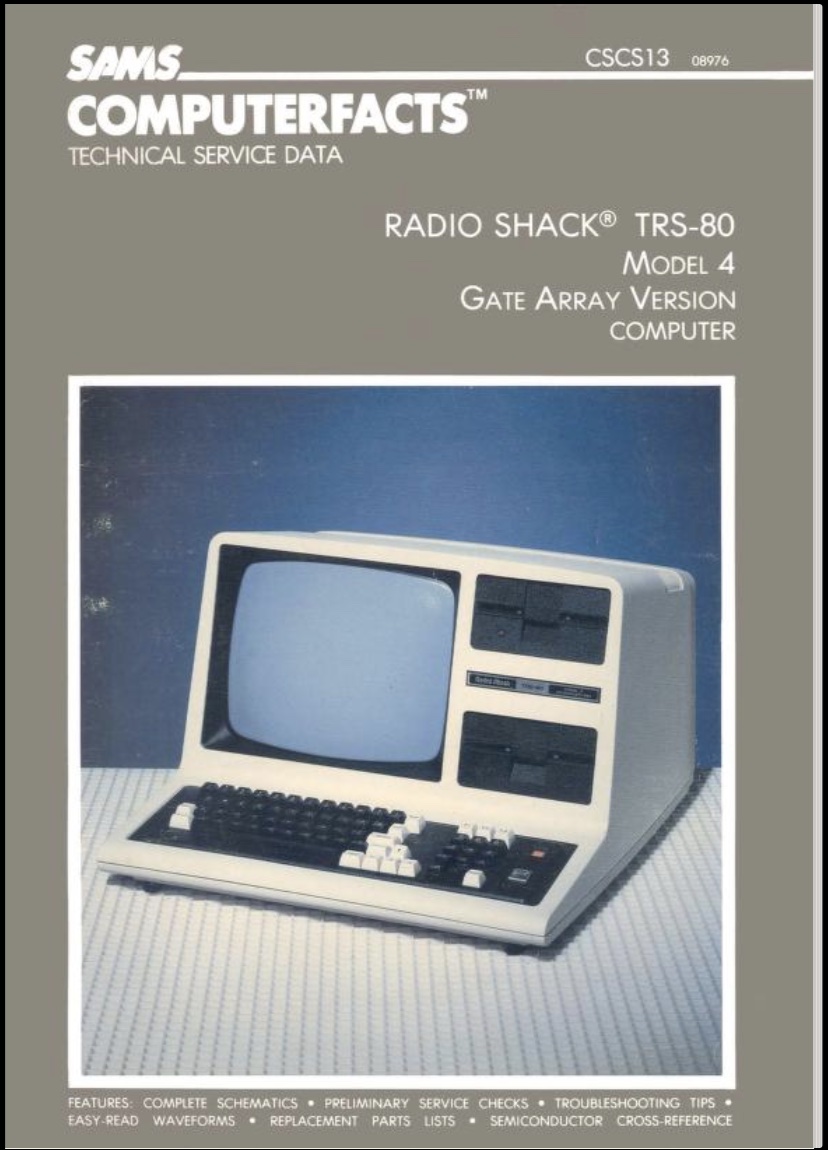
TRS-80 model 4

I naively plugged this thing in before reading any sort of restoration guides and within a minute a RIFA power filtering capacitor went up in smoke. A new, modern power supply made by a TRS-80 hobbyist later, it was running.

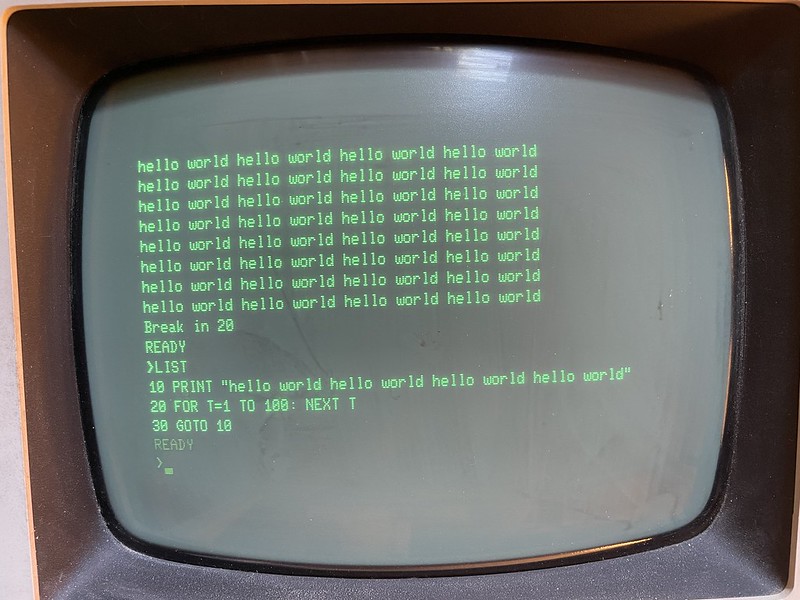
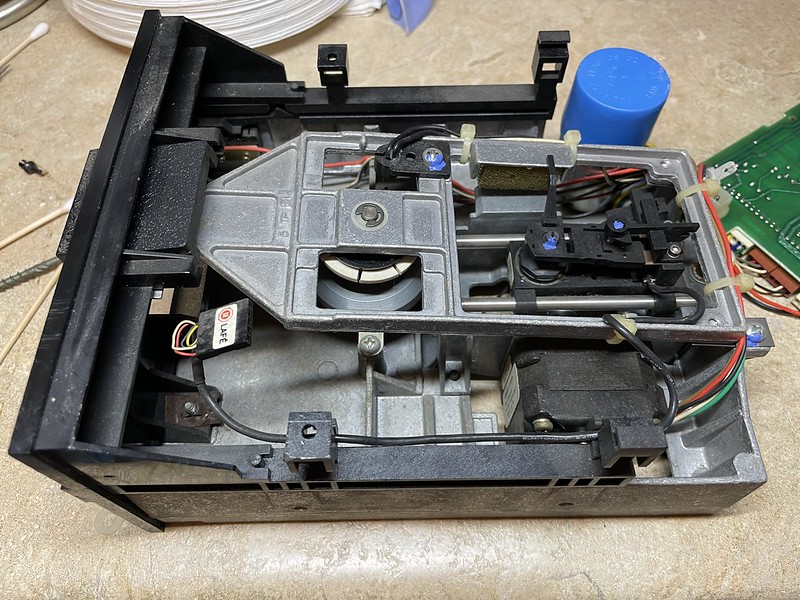
Problem is, disk 0 lights up but will not spin the disc at all. Based on what I’ve seen of similar IBM XT-era full-height floppy drives, there’s probably a drive belt on the bottom of the drive that has failed. I haven’t seen in anyone’s documentation if it’s some sort of direct drive or if it indeed has a belt, and I haven’t yet taken it apart again to see. Fortunately there’s a nice Youtube video on how to clean and lubricate TRS-80 drives which should be pretty handy in getting it going.

80286 and ST-225 hard drive

Broken split drive belt

[photos: flickr – ST-225 repair]

This was our first IBM clone at home from the mid-1990s. It boots, but the 20 megabyte (!) Seagate ST-225 MFM hard drive isn’t readable. It’s motors are quite loud so I’m pretty sure they’re spinning up and the stepper motor moves around a bit. I tried giving the stepper motor a drop of oil, but that didn’t help. I don’t really expect any data of interest on the disk, maybe some old Lotus 1-2-3 spreadsheets or Windows 3.0, but now I want to try to save it. As a last ditch effort I opened the drive up to see if there was anything obviously wrong like scratched platters before I gave up or decide to send it to a data recovery place.

When I opened it up, I immediately noticed a band that connects the stepper motor to the read/write arm had snapped off its end that secured it to a tiny peg. Without it, it couldn’t seek the heads across the platter. I had also noticed some light chips on the outside of the platter. I suspect this all happened from it’s 1,700 mile road trip and had I turned it on before I left it might have actually worked.

This set me out on a crusade to replace that little piece of metal band. Googling around I discovered it’s called a “split-band drive belt”. It’s metallic because it’ll stick to a magnet I have, yet it’s very flexible. At first I thought it might be some sort of mylar, but given it’s job to constantly wrap around the shaft of the stepper motor and pull the read/write arm around, I can’t imagine it to have much, if any, stretch.

I thought a strip of aluminum can might work, but after cutting it down to roughly the right size it’s clear it isn’t very flexible and wants to stay bent. I don’t have much confidence that would work, but who knows.

I even showed the problem to a semiconductor machinist friend if he had any idea what kind of material it was or what I could use to replace it with. He drew a blank, but suggested maybe the coil out of a thermostat or thermometer could work. The other alternative would be to buy another ST-225 drive off eBay, disassemble it, and steal the part from it. Those are going for over $50 + shipping now, whereas a thermometer at Wal-Mart was $11.

I discovered the temperature coil spring or whatever you call it is actually quite stiff, more so than aluminum. It was however almost exactly the same width as the broken band, so that was neat. The thermometer actually had a secondary needle, for relative humidity. This smaller coil appeared to be some sort of brass, it was the right width and appeared to be very flexible! Winner!

Original, aluminum, bi-metal, and brass

Because it was a smaller coil, maybe 3″ when flattened, I had only enough material to make one replacement band with it. The holes in each end of the original were 1/16th – 5/64 of an inch. I rigged up a jig to hold the material, drilled one hole before the belt in my cheap drill press snapped. And the spare too. I drilled the last hole by hand because I was in an excited rush, which was a bad idea because it was not a smooth hole.

Of course another problem with this approach is that the thermometer metal is designed to expand and contract, so it remains to be seen if this is a problem with such a short piece that could cause it to not align with magnetic tracks.

The original and newly made band

When I went to put on the replacement, I tugged just a bit too much trying to get the band over the last post and the ragged hole ripped out. Crap. So now I have to find replacement belts for my China Number One jeweler drill press and another thermometer to sacrifice.

I catch myself browsing for ST-225 drives on eBay, I may say screw it and get one for parts if it too hasn’t already suffered a similar fate.

Drill press

I bought the worlds smallest drill press to use for my various projects in my apartment. It’s great when I need it, very quiet, I can set it on the kitchen counter, poke some holes, and stick it back on the shelf when I’m done. It’s drive belt is a glorified red plastic rubber band.

In the process of drilling holes for the hard drive repair, it snapped, followed by the spare belt. It took me a while of Googling to find replacements for it because my unit’s part number wasn’t turning up anything, but I eventually found a jeweler supply shop that had some that fit. So that is at least one problem I’ve completely solved.

QIC-80 tapes

[photos: flickr – QIC-80 repair]

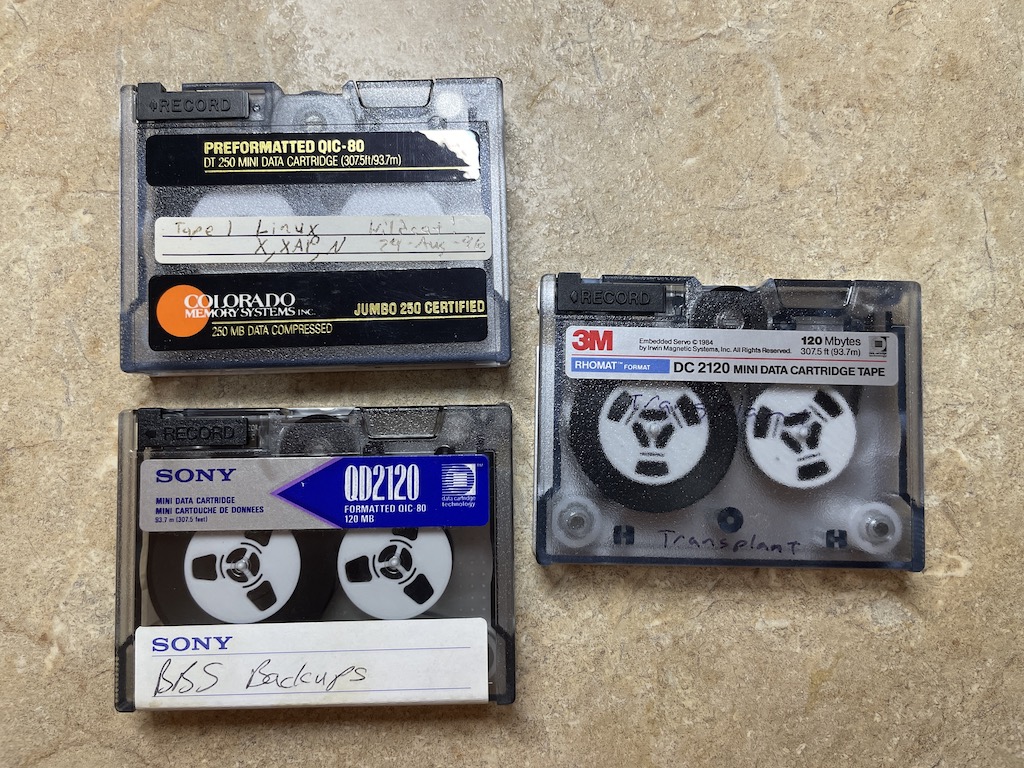
By some small miracle we found three of my old QIC-80 backup tapes while cleaning out the house. These are very important to me because they have backups of my old BBS I was running in 1995 and would very much like to get that data back.

This was a whole side yak shaving quest because Colorado QIC-80 tape drives like I had piggyback off a floppy disk controller. There were some external units that connected to a parallel port that the Internets said didn’t work too well, and wanting to have the greatest chance of success, bought an internal drive like I had before. The problem was I didn’t have a single thing anymore with a floppy disk controller, not even the various mini-ITX boards I had. I don’t think I ever even found a PCIe floppy controller either, just an ocean of IDE interfaces. So naturally I eBay’d a 486 system. Ironically the 486 I wound up getting just happened to have a Colorado tape drive in it, so now I have two!

Being the excited person I was, after getting Windows 95 and the Colorado Backup software installed, I stuck in a “new” QIC-80 tape I also eBay’d as a test. Formatting, re-tensioning, a backup and restore all went well. I popped in one of my BBS tapes and it instantly jammed. The tape was all kinked up inside the cartridge and somehow looped between the top of a spool and the top shell.

QIC-80 cartridges have an internal tension belt that wraps around the spools holding the magnetic tape, linking them together. Reading some blog posts it was mentioned that on older tapes these belts give out and cause the tape to slip or cause one spool not to pick up tape fed off the other spool, causing it to wad up. Fortunately it’s all contained within the tape cartridge, unlike a VCR or cassette tape player where it pulls the tape out and gets stuck in the reading mechanism. (Although in this instance, this wouldn’t even be a problem if the QIC tapes didn’t depend on a tension belt!)

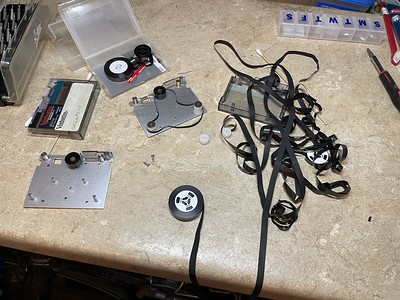
Again, being a do it yourselfer, how hard could it be? I have Youtube! I cracked open one of my BBS tapes and one of the “new” tapes to act as a donor. When I took the old tension belt off it just laid there like a limp noodle, it was clearly shot. The belt off the donor tape was clearly tighter, as soon as I had it off the spools it shriveled up, turned inside out into a wrinkly mess and I was worried that I could never get it back on.

I wound up moving the spools containing the tape from the old cartridge into the donor cartridge, that way all of the spindles and belt were known to be in good working order. I noticed the crinkled part of the tape was at the beginning, before an index hole so I thought maybe the data survived unscathed. Re-tensioning the belt turned out to be quite the pain in the ass! I found out the belt has quite a bit of elasticity to it, I was afraid I was going to snap the sucker getting it on all the spools again but time and time again I could pull on it just enough to get it in place. I was using the end of a wooden swab to pull things around as to not damage it more.

After getting the cartridge back together, I inserted it into the drive and with a loud screech it instantly jammed again. I took the cartridge apart again, wound things back the way they should and did the tension fiddling again. It’s quite annoying if you have slack on one spool because you have to find something to fully hold the tension belt away enough to spin the spool to take up the slack, else it’ll never work out. A couple of times I had a twist in the tension belt to work out. I also learned the belt has to be aligned exactly in the middle of the tape, if it’s high or low then it tends to push the tape up or down as it feeds off the spool, leading to it coming off. Also all of the spools and spindles are held in place by the top part of the plastic case, so without it as you wind the spools everything wants to lift upward.

I found the best way seems to be to first pull the belt over the black spool that interacts with the capstan, feed it through between the two tape spools, pull it taught to make sure its relatively untwisted, bring it down across the left spool of tape, loop it over the left white spool, while holding tension to keep it flat and in place. Then pull on it with some force using a end of a wooden swab to get it temporarily over the top of the post of the right spool. Assess if there’s any twists, any slack in the tape media, and make sure it’s aligned. Finally, get a good grip on everything, use the same wooden stick to pull tightly (yet gently) to stretch out the belt enough to get it all the way over the right hand white spool. Check things over again for any twists, slack, and alignment.

On second attempt it fed a little while and then jammed again. I don’t know what the RPM of the tape drive is, but when it goes south it goes in a hurry. It’s maddening because I can spin the tape by hand a couple dozen revolutions when the cover is off and it all works perfectly. I repeated this tape disassembly and assembly two more times, all times resulting in a jam. The tape was getting pretty wrinkled now from all the wadding up, I can’t imagine there any good data on that section. To add insult to injury, I dropped the cartridge at one point and the spools went flying to the floor. Several feet of tape unspooled, instantly catching the attention of one of my cats. Completely frustrated, I gave up at that point. I got all the tape wound back up, the tension belt on once again, and quit. I’m going to outsource this data recovery job to somebody else. Just maaaybe having it wound up and under tension again may help smooth some of the wrinkles for the next person.

I give up

Starting in high school English I and onward we had to spend like 10 minutes every class period writing in a journal that we had to hand in at the end of the nine week period for grading. Presumably this was to get us to write more and use our words, and we’d be graded on the number of pages. I absolutely hated this exercise because who does this teacher think she is, reading our private thoughts? It got more than one classmate in trouble when the subject of said writing was about teachers.

A while back I found these journals buried in a box in Oklahoma and dug them out to go through them again. I apparently hated this work so much I wrote about it daily, my hate of school, how bored I was, and other teenage angsty things.

However it did capture the time period when I started using bulletin boards, Linux, and the beginnings of my ISP (which I started in between my junior and senior years of high school). I was also raising sheep in a pasture in our backyard, so there were lots of entries about taking care of them, building fence, and other sheepy-things.

The earliest entry was the fall 1993 semester so I had just started using a modem that summer. Oddly enough I barely mentioned my PC work or upgrades which I was deeply into at the time, if I had then that may have helped bump up the page count.

Jan 12 1994: Got a copy of the Wildcat! BBS 2.6 Test Drive and installed it for the first time

Mar 17 1994: Got my own phone line, a root canal, and about to turn 15

Dec 5 1994: $70 phone bill!  Notes show that long distance calling after 6 PM was costing me 17 cents a minute.

Dec 20 1994: $30 CRIS/Concentric Research Net/BBS Direct bill, which provided 1-800 access to larger bulletin boards and SLIP/PPP Internet access

Mustang Software card

Jan 11 1995: Got a MSI hat, a shareware collection CD, and thanking me for answering a bunch of tech support questions about Wildcat! on the message boards over the holidays on the Mustang Software BBS

Jan 24 1995: Installed Slackware Linux for the first time on my 386SX

Jan 31 1995: Got Wildcat! BBS Multiline 10 up and working

Feb 6 1995: Went to a OneNet “convention” in Red Rock, OK to hear about the development of a statewide Internet for schools, first time I encountered a Sun SPARCstation. (Red Rock was a very wealthy school district that had state of the art everything including a 56k or T1 line)

Feb 9 1995: First time installing X-windows on my Linux box

Feb 14 1995: ran up 967 minutes of long distance calls, $80 CRIS bill

Feb 15 1995: Got my hands on some old VT-100 terminals from a surplus donation at school, realized how dumb terminals worked

Mar 3 1995: First time I’ve written HTML and uploaded a public web page to the CRIS web server

Aug 25 1995: Installed Windows 95 for the first time

Sep 1 1995: CRIS bill was $156

Dec 6 1995: Learned to configure named to set up a caching nameserver

Jan 3 1996: Compiled SOCKS 4.22 proxy server and kernel for first time (I forget what I was doing with this, maybe I had put my Linux box on my PPP connection and proxied my Windows 95 apps through it)

Sometime around this time period I had sold a 10Base2 network and some new computers to the school. They had a free PPP connection and I had rigged up things to share it along with DOS files on the LAN

Jan 8 1996: Got an IPX/ODI packet driver stack working on MS-DOS so TCP/IP and LANsmart could co-exist

Jan 23 1996: Get an account with a new ISP in the area, discover the wide area calling plan our telco offered did not cover it. This disappointed me so much and planted the ISP seed

Jan 29 1996: At school, built an ARCnet to Ethernet router with KA9Q NOS so older computers on old LAN can use Internet

Feb 29 1996: Declare my plans to start an ISP

March 5 1996: Went to a school board meeting to try to get them to get a leased line connection, tried to give an Internet demo

Apr 1 1996: Talking to Galaxy Star Systems (an ISP in Tulsa) about quotes on a 384k frame relay circuit

Apr 1996: Passed my Netware 3 Certified Novell Associate (CNA) cert; started searching for office space for the ISP, getting equipment quotes

I started my ISP in the summer of 1996, I want to say the 56k frame relay connection went up on June 18, 1996.


The 1996-1997 journal covers the growing pains and trying to break even before running out of runway.

Jan 6, 1997: Got an extra loan to build own office building to escape high rent

Jan 8, 1997: Got first Cisco 2501 router, learned how to configure it to be primary ISP router. I needed this because I was bringing in a second frame relay T1 to open my first POPs in other towns.

Jan 29, 1997: Southwestern Bell techs say T1s have been turned up at new building, moved all of our gear over, only to find out the other end of the T1 hasn’t been connected to the frame relay switch. Moved everything back that night, a several hour outage.

Feb 4 1997: Hit 160 monthly dialup customers, almost breaking even!

Mar 20, 1997: Turned 18, wrote hot checks to cover Southwestern Bell bills!

Mar 31, 1997: Finally turned a monthly profit of $100 for the first time. Went directly to Southwestern Bell to read their tariffs to see how to set up call forwarding to expand access, options on T1 contracts. Setting up largest PoP (2 or 3rd?). This is the start of me being a real thorn in the side of telcos.

Not a whole lot of journal entries after this. We were on a new very-not-good English teacher and guess she was pretty lax.

To this day I still have dreams where I’m an adult and am still in English class, like it never ended. Then I wake up and thank god I really passed and finished years ago.

TRS-80 nostalgia

This is going to read like one of those annoying-ass online recipes because I’m gonna write down some of my experiences with the TRS-80 before I start getting into what I’ve been doing to get it going again. However it is Father’s Day and this was my Dad’s computer so it’s kind of fitting.

After sitting in storage for 25+ years I finally brought home our old TRS-80 model 4 from Oklahoma. It probably hadn’t been turned on since the late 1990s. I didn’t want it for the longest time because the IBM PCs I built would run circles around it, I really didn’t have room for it, and plus I always flew back home so shipping it would be a pain. After I drove out to start cleaning out dad’s house, I brought it back to California to see if I could get it up and working again because retro/vintage computers are “in” now. Fortunately it was never abused in storage or sat outside, so I thought it had a decent chance at survival.

TRS-80 model 4


Way back in 1983 our first home computer was a TRS-80 model 3. I recently found the sales receipt for it, around $2500 for the computer, printer, some cables, around $7500 in 2023 dollars! At the time my family owned the natural gas company that provided gas to our small rural community with 100 or so customers. Dad wanted to use the computer to generate + print monthly bills for customers instead of doing it by hand. He was primarily a school teacher teaching business and not really a programmer, so he wound up taking night classes at college to write in BASIC, and gradually learning what he needed to do. I also recently found printouts of his class assignments, starting off with 10 line equivalents to Hello World and then adding in calculations and various outputs.

A printing company custom printed the tractor-fed postcards that were mailed out to customers. I remember the printing company had a cool ruler that had stencils for the tractor feed holes and line/character spacing of a dot matrix printer. You drew up exactly how you wanted the card to look, then made all the LPRINT statements in your code line up with the fields on the printout. (This came in handy later when I wrote a basic 1040-EZ tax program that would fill out a 1040-EZ form for you!)

I wasn’t really interested in the billing program, it was hours of work to run the bills each month. There wasn’t any sort of data store, arrears, last month and the current month’s meter readings had to be input for every customer. Further, all of the customer names and addresses were hardcoded into the program! The program didn’t do much input sanity, and if you made a mistake it threw things off and was a hassle to fix. So after messing up bills, that relieved me of the responsibility of running it.

However we did dabble in other software. We had Visicalc, Superscripsit, and a few dozen games. Some were on cassette, others were on double-sided 5.25″ floppy disks. Superscriptsit came with a tutorial on audio cassette, which taught me about proportional space fonts and some other word processor-y things. BASIC programs, I have no idea where they came from, probably hand made bootlegs that got passed around. There was a long piece of paper that told us kids which disk, which side, had a given game on it like CHICKEN.BAS and that was enough for us to LOAD it.

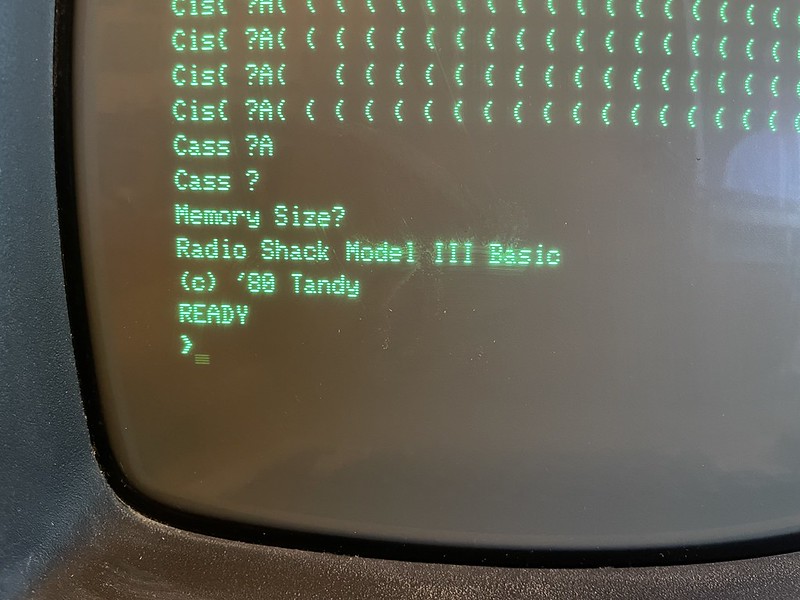
I was around 4-6 at the time and Dad showed me what he knew of BASIC. Things like everything had line numbers, do a PRINT to print it to the screen, LPRINT to make it go to the printer, IF andGOTO statements and what not. It wasn’t long before I was making piddly little programs. Back then a lot of BASIC programs were distributed in magazines and books. The full source code would be printed on a single page or if you were unlucky, multiple pages. It was up to you to type in the whole damn thing, perfectly, else it didn’t work, you got the dreaded Syntax Error? or it had bugs. I was also not a touch typist so it took me forever to type one of these things in one keyboard peck at a time. Fortunately once it was in and working, you could save it to a floppy and never have to type it in again. The upshot was that typing it in line by line you got to understand what the program was doing as it went along, picking up syntax and style.

As an aside, PC/Computing magazine also distributed little MS-DOS utilities the same way in the 90s, several paragraphs of hex values you that plugged into DEBUG.COM!

I don’t remember why, if it was related to the needs of the software or what, but we sold the Model 3 at some point. I was pretty upset at this, because now where would I play games? It wasn’t too long after that we got the Model 4. I seem to recall some stuff we had that ran on the Model 3 wouldn’t run on the Model 4. There was some sort of TRS-DOS conversion program that did something, I wish I could find it or at least the manual to understand what it did.

It feels like I was always on it every day. I was either playing games or fiddling around with other games. Sometimes I’d just be in a TRS-DOS shell goofing around and manage to get TRS-DOS to crash (probably buffer overrun of the command interpreter) in a spectacular fashion with all sorts of garbage spit out on the screen. I spent the majority of my time in BASIC, it wasn’t until way later that I realized TRS-DOS actually could do things other than load BASIC.

At school we started off with Commodore CBMs and then went on to Apple IIe in the computer room in the late 80s/early 90s. The Apples were much nicer to use than the TRS-80 and I got to fiddling with them instead. In the early 90s our school switched to IBM PC clones (8088s w/ monochrome screens, 512 K memory, MS-DOS 3.3), and shortly after we got a 286 at home. I pretty much abandoned the TRS-80 and spent all my time on the PC, altho Dad still used the TRS for billing until they sold off the gas company. After that, it just sat there on the desk under a dust cover.

Ironically years later when I started the ISP I too would wind up having to write my own billing system. Commercial ISP billing systems just didn’t exist. What started off as a bunch of copy-pasting of customer addresses in Excel quickly got out of hand. I had to go learn Perl, MySQL, PHP, and how to parse RADIUS logs or else not make any money!

I’ve long had a /48 from Hurricane Electric (HE)/Tunnelbroker for my IPv6 connectivity for servers I run at home and for general end-user purposes. I’ve also had Xfinity for years which has native IPv6, but never have used it for a couple of reasons. Firstly, I assume it’s a dynamically allocated prefix subject to change anytime which could unexpectedly break inbound connectivity to my Internet-facing servers when the address changes. Since iPhone 7 I’ve had IPv6 on my AT&T data service and it’s rather nice to hit something at home without port forwarding. I also run an authoritative DNS server on IPv6 at home for my domains, something not easily scriptable for changes.

Secondly, both Xfinity and HE do source address filtering, so traffic sourced from HE gets dropped when it exits via Xfinity and vice versa, so I can’t just run them in parallel without work. I didn’t want to deal with trying to script or dynamically update DNS hostnames and firewall rules to access my servers over Xfinity v6, and the HE tunnel has been very reliable. So, I want to keep my Internet-accessible servers on my HE /48 and let client-y things use Xfinity v6 otherwise.

The main problem is leaving v6 performance on the table once I got to using a faster Xfinity service. 6in4 traffic (IP protocol 41) is not handled by hardware offloading on Ubiquiti EdgeRouters. Even on an EdgeRouter 12, I can only get about 400 Mbit/s of tunneled IPv6 on my gigabit Xfinity service before the CPU runs out of steam (due to soft interrupts). Testing IPv4 only, I’m able to get ~950 Mbit/s through NAT. I’ve artificially throttled my IPv6 performance by only using the HE tunnel.

Another problem is that I’ve learned that some CDNs like Cloudflare and ticketing websites do not like requests from HE IPv6, presumably because they don’t like VPN and tunnel users.

Edit: I forgot, I run an authoritative name server for several of my domains from home over IPv6 because I haven’t always had another VPS somewhere to serve as a required secondary name server, that’s another reason for wanting a static /48. 

Enter policy routing

So to use both Xfinity and HE connections, I need some policy routing. Unfortunately EdgeOS and the Vyatta stack on the EdgeRouter doesn’t natively support IPv6 policy routing through the GUI or config tree, just IPv4. Fortunately it runs a Linux kernel and it has the iproute2 packages installed so it’s possible to manipulate the kernel routing tables directly to set up IPv6 policy routing via ip rule and ip route commands.

I had looked at this years ago and it sounded annoying to set up, but in the end taking it command by command it wasn’t so bad. I referenced these web pages to get ideas what to configure:

https://serverfault.com/questions/854094/linux-ipv6-policy-based-routing-fails

https://www.sixxs.net/forum/?msg=setup-10320966

https://jsteward.moe/he-ipv6-routing-on-machines-with-ipv6.html

https://web.archive.org/web/20130812091825/http://itkia.com/ipv6-policy-routing-linux-gotchas/

Topology

My home network looks something like this:

There is one router connected to my Xfinity cable modem, two segregated LANs. One is my plain simple home network where all of my wired and wireless phones, laptops, desktops, IoT devices live. It has a 192.168.x.x IPv4 /24 and the first routed /64 that HE assigns to your Tunnelbroker account. The second LAN is behind another router serving up ikeacluster and the rest of my development network. It’s where most of my Internet-accessible servers live and it’s part of the routed /48 network from HE.

In this scenario, I have two IPv6 networks I need to policy route. One is my daily driver /64, and one is my homelab /48 network. I am only interested in Xfinity IPv6 addresses on my daily network, and therefore do not do any sort of prefix delegation to the ikeacluster/homelab side. For the most part devices either get v6 addresses as static assignments or SLAAC.

What I will wind up with is that homelab addresses will stay exactly the same, within the same HE /48. What will change is that now my home network will get both RAs. Things like my phone, laptop, Apple TV will get 2 IPv6 addresses now, one from the same HE /64 as before, and now a Xfinity IPv6 2601:: address. Only HE traffic is special cased, I have not mangled Xfinity traffic at all. I could have gone as far as removing RAs for my HE prefix on my home LAN so things like my laptop/phone/TV only get Xfinity v6 addresses, leaving static HE address assignments to a few select boxes, and it probably would work just fine, but I decided to let them have both.

Router config

This assumes you already have a working tunnel to HE. You have just a /64 or you have a /48 routed from HE toward your tunnel.

To set up v6 policy routing here, expect some temporary IPv6 breakage as you move default routes around. You’ll need to remove the existing default IPv6 route you have pointing at HE’s tun0 interface, then configure DHCPv6 PD for Xfinity. What will happen is as you configure the EdgeRouter for Xfinity IPv6, you configure the DHCPv6 prefix delegation and router advertisements on your LAN and commit, all of a sudden all of the devices on the LAN will learn two v6 addresses (HE and Xfinity) and two gateways. Until you get policy routing going, v6 traffic could start egressing via the wrong ISP/connection. If you get in a panic and try to un-configure the Xfinity PD and RAs on the EdgeRouter, all of your LAN devices have more than likely already learned an Xfinity address and default route and will stay that way until the lifetimes expire (several minutes) or you manually go around fixing them. It’s not the end of the world, just be aware of it.

I recommend setting up DHCPv6 prefix delegation first on your WAN interface facing Xfinity. Commit this first and you should have a /128 address show up on your WAN interface. This at least lets you know Xfinity and PD is somewhat working before you get further.

e.g.

set interface ethernet eth0 dhcpv6-pd pd 0 interface eth8
set interface ethernet eth0 dhcpv6-pd pd 0 prefix-length 60
set interface ethernet eth0 dhcpv6-pd rapid-commit enable
commit
save

[bwann@home-gw1 ~]$ show interfaces
Codes: S - State, L - Link, u - Up, D - Down, A - Admin Down
Interface IP Address S/L Description
--------- ---------- --- -----------
eth0 98.47.xxx.xxx/22 u/u outside
2001:558:6045:c0:4040:aaaa:bbbb:cccc/128


Later, or now, #yolo, enable prefix delegation and begin sending out RAs on your LAN:

set interface ethernet eth8 ipv6 router-advert prefix ::/64 autonomous-flag true
set interface ethernet eth8 ipv6 router-advert prefix ::/64 on-link-flag true
set interface ethernet eth8 ipv6 router-advert prefix ::/64 valid-lifetime 2592000
commit
save

Firewall considerations

You’ll need to apply an IPv6 firewall policy to your WAN interface along with your HE tunnel interface because now you have v6 coming in on two interfaces. My firewall rules are default deny-all on inbound, with rules to allow from specific addresses and/or to specific addresses, with no consideration of the actual interface names. This means I can re-use my existing HE tunnel rules on my WAN interface to keep everything in one place (here I have a rule for v6 traffic passing /through/ my router and another ruleset going /to/ my router)

# WAN interface rules matches tun0 interface
set interface ethernet eth0 firewall in ipv6-name outside6 set interface ethernet eth0 firewall local ipv6-name system6

Policy script

Next, I have written a script to bring up my policy routing in an idempotent manner. I actually wrote and tested this one line at a time so it should be safe running it over and over again. I saved this to /config/scripts/policy.sh so it persists between EdgeOS upgrades:


#!/bin/bash
#
# IPv6 prefixes to policy route
prefixes="2001:470:1f05:2c9::/64 2001:470:8122::/48"

# Add he-ipv6 table
if ! grep "^200 he-ipv6" /etc/iproute2/rt_tables ; then echo "200 he-ipv6" >> /etc/iproute2/rt_tables ; fi

# Flush everything and re-add standard EdgeOS rules
ip -6 rule flush
ip -6 rule add priority 32766 from all lookup main
ip -6 rule add priority 220 not from all fwmark 0xffffffff lookup 220

ip -6 route flush table he-ipv6 || true

for prefix in ${prefixes} ; do
ip -6 rule add from ${prefix} table he-ipv6 || true
done

for prefix in ${prefixes} ; do
ip -6 rule add to ${prefix} table main || true
done

# Comcast dhcpv6-pd prefix, punt to main table
ip -6 rule add from all to 2601:646::/32 lookup main

# for prefix in "${prefixes}" ; do
# ip -6 route add unreachable ${prefix}
# ip -6 route add unreachable ${prefix} table he-ipv6
# done

# Set default route in he-ipv6 table to HE's end of the tunnel
ip -6 route add default via 2001:470:1f04:2c9::1 dev tun0 table he-ipv6

Walking through what this does:

# IPv6 prefixes to policy route
prefixes="2001:470:1f05:2c9::/64 2001:470:8122::/48"

A simple string list of prefixes to policy route, separated by spaces.


# Add he-ipv6 table
if ! grep "^200 he-ipv6" /etc/iproute2/rt_tables ; then echo "200 he-ipv6" >> /etc/iproute2/rt_tables ; fi

Create a new, separate route table to hold our rules and routes for HE sourced traffic. If it’s already in the rt_tables file, do nothing.

ip -6 rule flush
ip -6 rule add priority 32766 from all lookup main
ip -6 rule add priority 220 not from all fwmark 0xffffffff lookup 220

Blow away any existing IPv6 rules to ensure we’re working with a clean slate. Re-add what should be standard out-of-the-box rules, using the main routing table. I’m not exactly sure what the fwmark lookup with table 220 is for, as there’s no mention of it in /etc/iproute2 anywhere, but we’ll faithfully re-add it because it’s what was there to begin with. (You can run ip -6 rule showto see what was there to begin with before flushing them.)

ip -6 route flush table he-ipv6 || true

for prefix in ${prefixes} ; do
ip -6 rule add from ${prefix} table he-ipv6 || true
done

Do a similar thing, blow away any existing routes in our he-ipv6 routing table so we’re sure we’re only policy routing what the script expects. Always return true even if we don’t flush anything. Then iterate through our prefix list, adding from rules to our he-ipv6 table, this is what will actually match on the source address of the HE traffic.


for prefix in ${prefixes}; do
ip -6 rule add to ${prefix} table main || true
done

Add rules so if there’s traffic coming into the EdgeRouter then send it to the normal routing table. Basically if it’s local traffic, keep it local. This solves an embarrassing side effect that when I would try to connect from my laptop in the livingroom on a Xfinity v6 address to a machines in the homelab with an HE address in the bedroom, the traffic would bounce down to San Jose and back.


# Comcast dhcpv6-pd prefix, punt to main table
ip -6 rule add from all to 2601:646::/32 lookup main

2601:646:: is currently the /32 that my /60 prefix is ultimately delegated out of. I don’t know if/how often the /60 changes, so I’m trying to take into account any future changes.

Add a rule I believe similarly, any traffic from a Xfinity address, send it to the main routing table. This is hacky because who knows when I won’t get a prefix delegation from 2601::646::/32 anymore and could be scripted better.

ip -6 route add default via 2001:470:1f00:___::1 dev tun0 table he-ipv6

Lastly, add the default route for the HE routing table to point at the remote end of my HE tunnel.

In some of the examples I linked above, people were going further an adding statements to make certain addresses/endpoints unreachable. I don’t think that’s necessary in my case, or at least so far I haven’t experienced any weird side effects after running this for several months.

TODO: This script needs to run every time at boot to set up the policy routing. I haven’t gotten around to that, probably needs to be a task-scheduler job or similar.

Multiple router advertisements on same LAN are fine

On my home LAN it doesn’t really matter that my EdgeRouter is sending out RAs for both the HE /64 and the delegated Xfinity /64. The next-hop for the default router goes to the same place. I can stick a random Raspberry Pi on the home network, it’ll get an address from both /64s and work just fine reaching the Internet and the rest of my networks.

Results

After running the script, thing should look something like this:

root@home-gw1:/home/bwann# ip -6 route show | grep default
default via fe80::21c:73ff:fe00:99 dev eth0 proto ra metric 1024 expires 1798sec hoplimit 64 pref medium

root@home-gw1:/home/bwann# ip -6 route show table he-ipv6 | grep default
default via 2001:470:1f04:___::1 dev tun0 metric 1024 pref medium

The main v6 routing table should only have a single default route, in this case the fe80:...:fe00:99 is the Xfinity v6 gateway I learned from DHCPv6. Likewise the he-ipv6 routing table should have a single default route, pointing at the remote end (HE’s side) of my tunnel.

root@home-gw1:/home/bwann# ip -6 rule show
0: from all lookup local
214: from all to 2601:646::/32 lookup main
216: from all to 2001:470:8122::/48 lookup main
217: from all to 2001:470:1f05:___::/64 lookup main
218: from 2001:470:8122::/48 lookup he-ipv6
219: from 2001:470:1f05:___::/64 lookup he-ipv6
220: not from all fwmark 0xffffffff lookup 220
32766: from all lookup main

root@home-gw1:/home/bwann# ip -6 rule show table he-ipv6
218: from 2001:470:8122::/48 lookup he-ipv6
219: from 2001:470:1f05:___::/64 lookup he-ipv6

Rules configured, the key part here is that traffic from my HE addresses are going to be routed according to the he-ipv6 . I.e. traffic sourced from my HE /64 and /48 will egress via my HE tunnel, anything not matching it egresses via Xfinity.

Traceroute results

Here’s proof in the pudding or something:

From one of my Linux boxes on my home network that only has an IPv6 address from the HE /64, traceroute to facebook goes via the HE tunnel:

[bwann@raptor ~]$ traceroute6 www.facebook.com
traceroute to www.facebook.com (2a03:2880:f131:83:face:b00c:0:25de), 30 hops max, 80 byte packets
1 2001:470:1f05:___::1 (2001:470:1f05:___::1) 0.270 ms 0.196 ms 0.161 ms
2 tunnel263332.tunnel.tserv3.fmt2.ipv6.he.net (2001:470:1f04:2c9::1) 15.380 ms 22.593 ms 21.033 ms
3 10ge11-19.core4.fmt2.he.net (2001:470:0:45::1) 19.478 ms 22.419 ms 19.383 ms
4 * * *
5 xe-0.equinix.snjsca04.us.bb.gin.ntt.net (2001:504:0:1::2914:1) 23.900 ms 23.379 ms
xe-0.paix.plalca01.us.bb.gin.ntt.net (2001:504:d::6) 23.790 ms
6 * * 2001:418:0:5000::751 (2001:418:0:5000::751) 30.911 ms
...
10 po243.psw02.sjc3.tfbnw.net (2620:0:1cff:dead:beef::5ddf) 20.820 ms
edge-star-mini6-shv-01-sjc3.facebook.com (2a03:2880:f131:83:face:b00c:0:25de) 20.502 ms 20.415 ms


From my laptop on the same LAN with both HE and Xfinity addresses, to facebook, this time it goes out via Xfinity:

lapdance:~ bwann$ traceroute6 www.facebook.com
traceroute6 to star-mini.c10r.facebook.com (2a03:2880:f131:83:face:b00c:0:25de) from 2601:646:9e01:1600:ad2f:8fee:48af:d42e, 64 hops max, 12 byte packets
1 2601:646:9e01:1600:7683:c2ff:fe14:5129 4.050 ms 3.651 ms 4.056 ms
2 2001:558:1014:30::2 10.578 ms
2001:558:1014:30::3 15.969 ms
2001:558:1014:30::2 15.631 ms
3 po-324-346-rur202.sanjose.ca.sfba.comcast.net 22.185 ms
2001:558:82:840a::1 10.807 ms
po-324-346-rur202.sanjose.ca.sfba.comcast.net 16.639 ms
4 2001:558:80:168::1 11.184 ms
po-2-rur201.sanjose.ca.sfba.comcast.net 12.387 ms
2001:558:80:168::1 12.626 ms
...
13 po7.msw1at.01.sjc3.tfbnw.net 16.717 ms
edge-star-mini6-shv-01-sjc3.facebook.com 15.436 ms
po7.msw1ag.01.sjc3.tfbnw.net 18.761 ms

From my laptop to my Chef server running in ikeacluster:

lapdance:~ bwann$ traceroute6 chef.wann.net
traceroute6 to chef.wann.net (2001:470:8122:1:227:eff:fe26:3238) from 2001:470:1f05:2c9:ad2f:8fee:48af:d42e, 64 hops max, 12 byte packets
1 2001:470:1f05:___::1 3.843 ms 2.304 ms 3.729 ms
2 2001:470:8122:___::2 2.702 ms 3.229 ms 3.116 ms
3 2001:470:8122:1:227:eff:fe26:3238 3.886 ms 2.440 ms 2.128 ms

Caveats and side effects

OS source address selection, in particular “use longest matching prefix” on dual-addressed machines can have undesirable effects with this policy routing.

In the case where a machine has multiple IPv6 addresses, RFC 6724 lays out a whole slew of rules to pick what local address is used when connecting to something on the Internet. Depending on the address of what you’re connecting to, traffic may go out via different route than you expect.

For example early on I was wondering why my speed tests from my laptop using Xfinity’s website weren’t showing any improvement. My laptop has both a HE address starting with 2001:: and an Xfinity address starting with 2601::. Lo and behold, www.xfinity.com resolves to `2001:559:19:6089::2af2` so MacOS is sourcing my request from my HE address, and thus my Speedtest was going through the HE tunnel and not over Xfinity native IPv6! Thus it was still hitting the original performance bottleneck and showing I could only do 400 mbit/s of IPv6. Temporarily removing the HE address, I was then able to hit 990 mbit/s of IPv6 using Xfinity natively. Quite a difference!

tl;dr anything that resolves to 2001::something may always go out HE.


« Newer Posts - Older Posts »